> ## Documentation Index
> Fetch the complete documentation index at: https://docs.keywordsai.co/llms.txt
> Use this file to discover all available pages before exploring further.
# Fallback models
> This is the guide for how to set up fallbacks in Keywords AI
Keywords AI will catch any errors occurring in a request to model and fall back to the list of models you specified in the `fallback_models` field. This is useful to avoid downtime and ensure that your application is always available.
See all Keywords AI params [here](/api-endpoints/develop/gateway/chat-completions#keywords-ai-parameters).
## Set up fallbacks
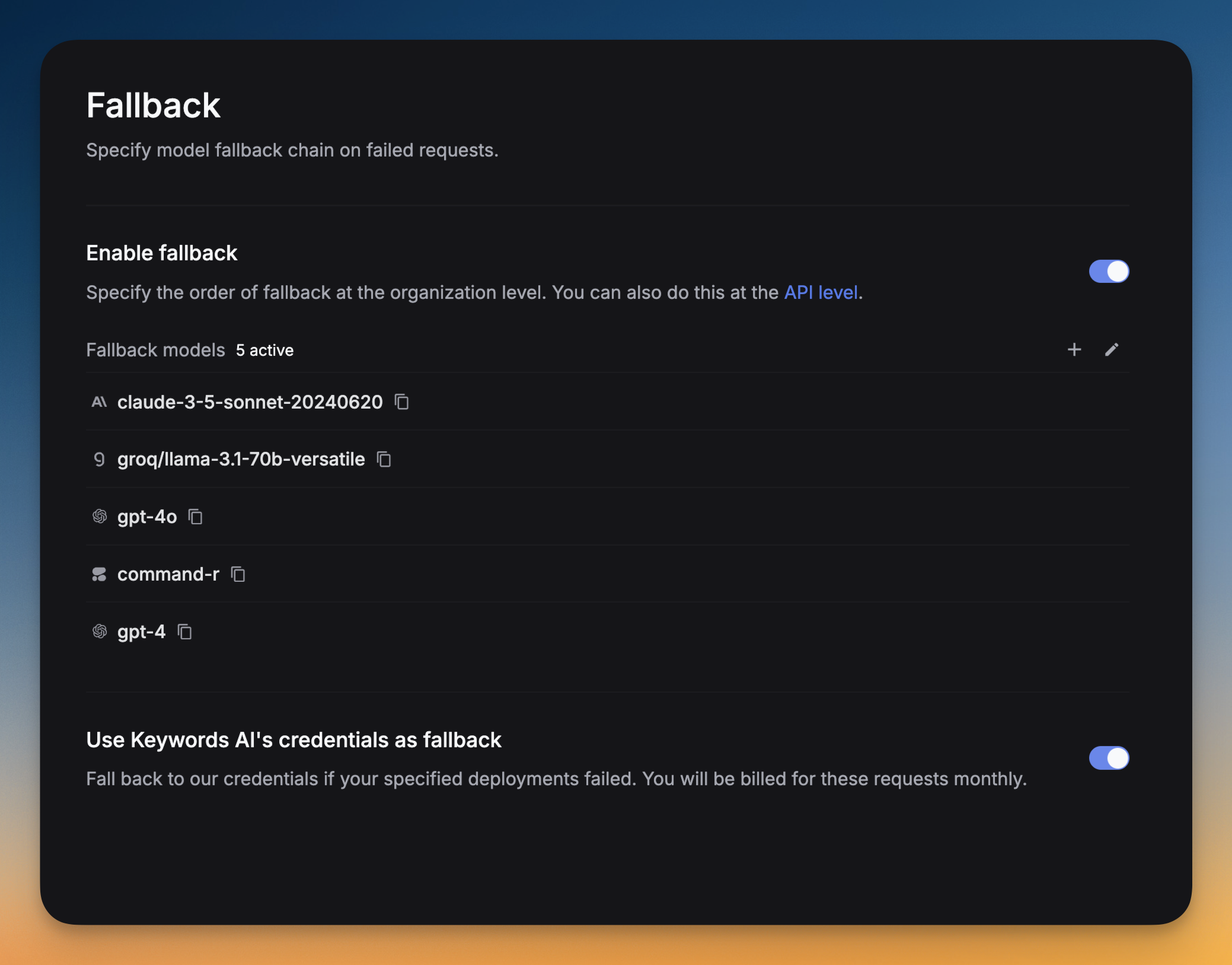
Fallback models can be set up in the UI or in the code. You can add multiple fallback models to the list, we will try each model in the order they are listed.
### Set up fallbacks from the UI
Go to Settings -> [Fallback](https://platform.keywordsai.co/platform/api/fallback) -> Click on `Add fallback models` -> Select the models you want to add as fallbacks.
You can drag and drop the models to reorder them. The order of the models in the list is the order in which they will be tried.
 ### Set up fallbacks in code
```python {14} theme={"system"}
from openai import OpenAI
client = OpenAI(
base_url="https://api.keywordsai.co/api/",
api_key="YOUR_KEYWORDSAI_API_KEY",
)
response = client.chat.completions.create(
model="gpt-4o-mini",
messages=[
{"role": "user", "content": "Tell me a long story"}
],
extra_body={
"fallback_models": ["claude-3-5-sonnet-20240620", "gemini-1.5-pro-002"]
}
)
```
In OpenAI TypeScript SDK, you should add a `// @ts-expect-error` before the `fallback_models` field.
```typescript {12} theme={"system"}
import { OpenAI } from "openai";
const client = new OpenAI({
baseURL: "https://api.keywordsai.co/api",
apiKey: "YOUR_KEYWORDSAI_API_KEY",
});
const response = await client.chat.completions
.create({
messages: [{ role: "user", content: "Say this is a test" }],
model: "gpt-4o-mini",
// @ts-expect-error
fallback_models: ["claude-3-5-sonnet-20240620", "gemini-1.5-pro-002"]
})
.asResponse();
console.log(await response.json());
```
```python {14} theme={"system"}
import requests
def demo_call(input,
model="gpt-4o-mini",
token="YOUR_KEYWORDS_AI_API_KEY",
):
headers = {
'Content-Type': 'application/json',
'Authorization': f'Bearer {token}',
}
data = {
'model': model,
'messages': [{'role': 'user', 'content': input}],
'fallback_models': ["claude-3-5-sonnet-20240620", "gemini-1.5-pro-002"]
}
response = requests.post('https://api.keywordsai.co/api/chat/completions', headers=headers, json=data)
return response
messages = "Say 'Hello World'"
print(demo_call(messages).json())
```
We also support adding credentials in other SDKs or languages, please check out our [integration section](/documentation/admin/llm_provider_keys) for more information.
## Troubleshooting
* You turned off Fallbacks in the UI
* You uploaded some invalid [`provider_credentials`](/documentation/admin/llm_provider_keys)
* The models you specified in the Fallbacks list are not available
* The provider of the model does not return a response (so we can't detect if it's down or not)
### Set up fallbacks in code
```python {14} theme={"system"}
from openai import OpenAI
client = OpenAI(
base_url="https://api.keywordsai.co/api/",
api_key="YOUR_KEYWORDSAI_API_KEY",
)
response = client.chat.completions.create(
model="gpt-4o-mini",
messages=[
{"role": "user", "content": "Tell me a long story"}
],
extra_body={
"fallback_models": ["claude-3-5-sonnet-20240620", "gemini-1.5-pro-002"]
}
)
```
In OpenAI TypeScript SDK, you should add a `// @ts-expect-error` before the `fallback_models` field.
```typescript {12} theme={"system"}
import { OpenAI } from "openai";
const client = new OpenAI({
baseURL: "https://api.keywordsai.co/api",
apiKey: "YOUR_KEYWORDSAI_API_KEY",
});
const response = await client.chat.completions
.create({
messages: [{ role: "user", content: "Say this is a test" }],
model: "gpt-4o-mini",
// @ts-expect-error
fallback_models: ["claude-3-5-sonnet-20240620", "gemini-1.5-pro-002"]
})
.asResponse();
console.log(await response.json());
```
```python {14} theme={"system"}
import requests
def demo_call(input,
model="gpt-4o-mini",
token="YOUR_KEYWORDS_AI_API_KEY",
):
headers = {
'Content-Type': 'application/json',
'Authorization': f'Bearer {token}',
}
data = {
'model': model,
'messages': [{'role': 'user', 'content': input}],
'fallback_models': ["claude-3-5-sonnet-20240620", "gemini-1.5-pro-002"]
}
response = requests.post('https://api.keywordsai.co/api/chat/completions', headers=headers, json=data)
return response
messages = "Say 'Hello World'"
print(demo_call(messages).json())
```
We also support adding credentials in other SDKs or languages, please check out our [integration section](/documentation/admin/llm_provider_keys) for more information.
## Troubleshooting
* You turned off Fallbacks in the UI
* You uploaded some invalid [`provider_credentials`](/documentation/admin/llm_provider_keys)
* The models you specified in the Fallbacks list are not available
* The provider of the model does not return a response (so we can't detect if it's down or not)