> ## Documentation Index
> Fetch the complete documentation index at: https://docs.keywordsai.co/llms.txt
> Use this file to discover all available pages before exploring further.
# Custom properties
> Custom properties allows you to add any additional information to your logs, which can help you tag and filter logs.
## What is a custom property?
A custom property is a key-value pair that you can add to an LLM log when sending an LLM log to Keywords AI. It can help you tag and filter LLM logs.
## Why use custom properties?
* Tag and filter LLM logs in your way.
* Add any additional information to your logs.
## How to pass custom properties
You can pass custom properties to Keywords AI by adding a `metadata` field to the request body.
Here is an example of how to send 2 custom metadata to Keywords AI in the OpenAI Python SDK.
```python {13-18} theme={"system"}
from openai import OpenAI
client = OpenAI(
base_url="https://api.keywordsai.co/api/",
api_key="YOUR_KEYWORDSAI_API_KEY",
)
response = client.chat.completions.create(
model="gpt-4o-mini",
messages=[
{"role": "user", "content": "Tell me a long story"}
],
extra_body={
"metadata": {
"env": "production",
"language": "en"
}
}
)
```
Here is an example of how to send 2 custom metadata to Keywords AI in the OpenAI TypeScript SDK. In OpenAI TypeScript SDK, you should add a `// @ts-expect-error` before the metadata field.
```typescript {12-16} theme={"system"}
import { OpenAI } from "openai";
const client = new OpenAI({
baseURL: "https://api.keywordsai.co/api",
apiKey: "YOUR_KEYWORDSAI_API_KEY",
});
const response = await client.chat.completions
.create({
messages: [{ role: "user", content: "Say this is a test" }],
model: "gpt-4o-mini",
// @ts-expect-error
metadata: {
"env": "production",
"language": "en"
}
})
.asResponse();
console.log(await response.json());
```
```python Async logging {16-19} theme={"system"}
import requests
url = "https://api.keywordsai.co/api/request-logs/create/"
payload = {
"model": "gpt-4o-mini",
"prompt_messages": [
{
"role": "user",
"content": "Hi"
},
],
"completion_message": {
"role": "assistant",
"content": "Hi, how can I assist you today?"
},
"metadata": {
"env": "production",
"language": "en"
}
# other parameters
}
headers = {
"Authorization": "Bearer YOUR_KEYWORDS_AI_API_KEY",
"Content-Type": "application/json"
}
response = requests.request("POST", url, headers=headers, json=payload)
```
```python LLM proxy {14-17} theme={"system"}
import requests
def demo_call(input,
model="gpt-4o-mini",
token="YOUR_KEYWORDS_AI_API_KEY",
):
headers = {
'Content-Type': 'application/json',
'Authorization': f'Bearer {token}',
}
data = {
'model': model,
'messages': [{'role': 'user', 'content': input}],
'metadata': {
"env": "production",
"language": "en"
}
}
response = requests.post('https://api.keywordsai.co/api/chat/completions', headers=headers, json=data)
return response
messages = "Say 'Hello World'"
print(demo_call(messages).json())
```
We also support adding credentials in other SDKs or languages, please check out our [integration section](/documentation/admin/llm_provider_keys) for more information.
## Filter dashboard metrics
To use custom properties for filtering in the dashboard, you need to index the custom properties in the platform, otherwise the custom properties will not be available for filtering.
Filtering by custom properties in the dashboard is only available for **Team plan** and **Enterprise plan** users.
### Filters in dashboard
After indexing the custom properties, you can filter the dashboard metrics by the custom properties.
 ## Filter Logs
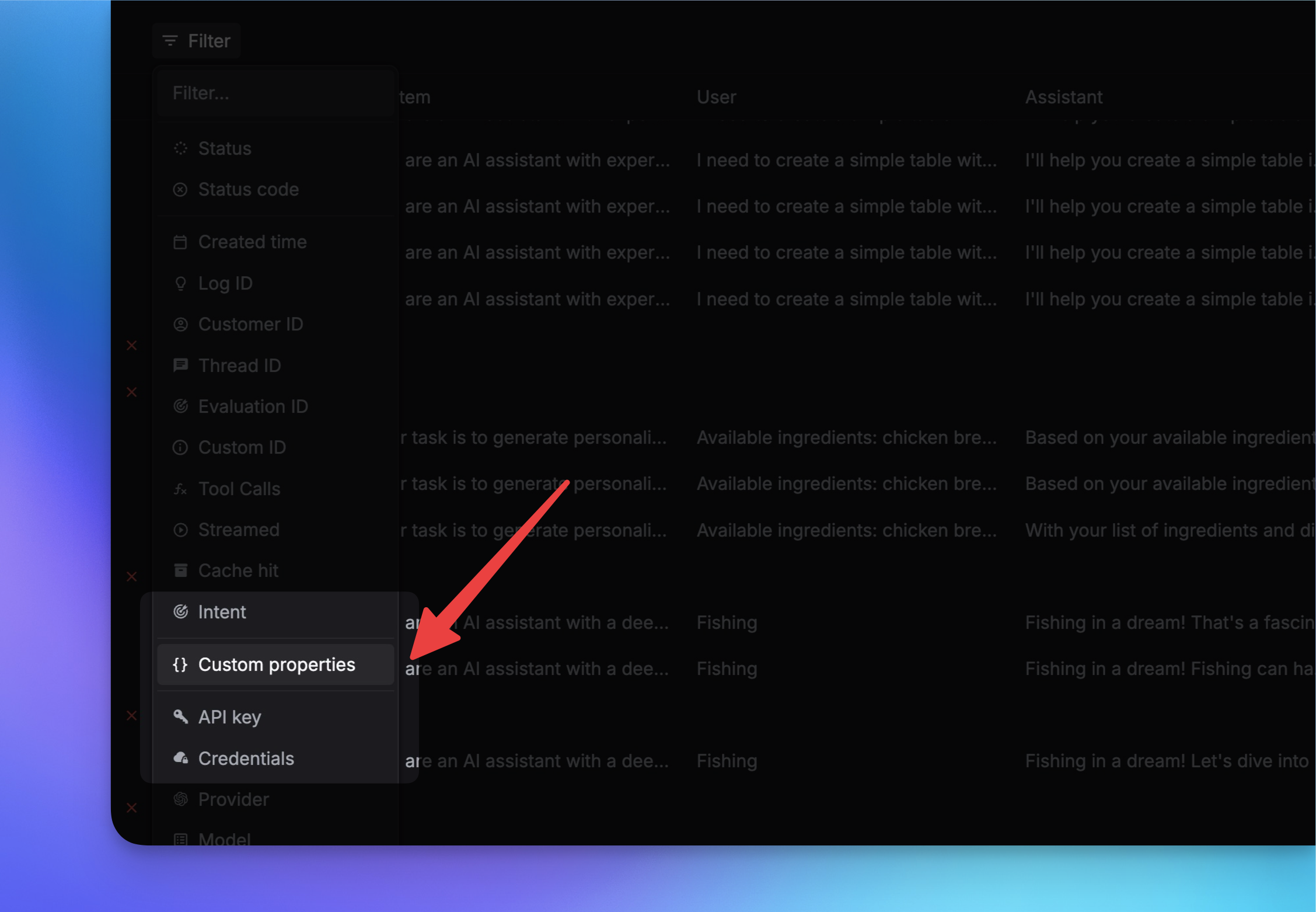
You can also filter logs by custom properties on the Logs page. Just click on the `Filter` button to filter the logs by the `Custom properties`.
## Filter Logs
You can also filter logs by custom properties on the Logs page. Just click on the `Filter` button to filter the logs by the `Custom properties`.
 {/* ### Filter logs by custom properties
*/}
## Update custom properties
You can also update the custom properties of a log through the API.
Here are the steps to update the custom properties of a log:
You need first to get the `unique_id` of the log you want to update. You can get the `unique_id` from the [Logs list endpoint](/api-endpoints/observe/logs/list). OR you can get the `unique_id` from [Logs page](https://platform.keywordsai.co/platform/requests)'s `Log ID` column.
Pass the `unique_id` to the `/api/request-logs/batch-update/` endpoint with the metadata and notes you want to update.
```python Python theme={"system"}
import requests
url = "https://api.keywordsai.co/api/request-logs/batch-update/"
api_key = "YOUR_KEY" # Replace with your actual Keywords AI API key
data = {
"logs": [
{ "unique_id": "xxxxxx",
"metadata": {
"env": "production",
"language": "en"
},
"note": "updated note"
}
# other logs to update
]
}
headers = {
"Authorization": f"Bearer {api_key}",
"Content-Type": "application/json"
}
response = requests.patch(url, headers=headers, json=data)
print(response.json())
```
```typescript TypeScript theme={"system"}
fetch("https://api.keywordsai.co/api/request-logs/batch-update/", {
method: 'PATCH',
headers: {
'Content-Type': 'application/json',
'Authorization': 'Bearer Your_Keywords_AI_API_Key '
},
body: JSON.stringify({
logs: [
{ unique_id: "xxxxxx",
metadata: {
env: "production",
language: "en"
},
note: "updated note"
}
// other logs to update
]
})
})
.then(response => response.json())
.then(data => console.log(data));
```
{/* ### Filter logs by custom properties
*/}
## Update custom properties
You can also update the custom properties of a log through the API.
Here are the steps to update the custom properties of a log:
You need first to get the `unique_id` of the log you want to update. You can get the `unique_id` from the [Logs list endpoint](/api-endpoints/observe/logs/list). OR you can get the `unique_id` from [Logs page](https://platform.keywordsai.co/platform/requests)'s `Log ID` column.
Pass the `unique_id` to the `/api/request-logs/batch-update/` endpoint with the metadata and notes you want to update.
```python Python theme={"system"}
import requests
url = "https://api.keywordsai.co/api/request-logs/batch-update/"
api_key = "YOUR_KEY" # Replace with your actual Keywords AI API key
data = {
"logs": [
{ "unique_id": "xxxxxx",
"metadata": {
"env": "production",
"language": "en"
},
"note": "updated note"
}
# other logs to update
]
}
headers = {
"Authorization": f"Bearer {api_key}",
"Content-Type": "application/json"
}
response = requests.patch(url, headers=headers, json=data)
print(response.json())
```
```typescript TypeScript theme={"system"}
fetch("https://api.keywordsai.co/api/request-logs/batch-update/", {
method: 'PATCH',
headers: {
'Content-Type': 'application/json',
'Authorization': 'Bearer Your_Keywords_AI_API_Key '
},
body: JSON.stringify({
logs: [
{ unique_id: "xxxxxx",
metadata: {
env: "production",
language: "en"
},
note: "updated note"
}
// other logs to update
]
})
})
.then(response => response.json())
.then(data => console.log(data));
```