> ## Documentation Index
> Fetch the complete documentation index at: https://docs.keywordsai.co/llms.txt
> Use this file to discover all available pages before exploring further.
# Decorators
> Use decorators to instrument your code and automatically trace your LLM workflows with minimal code changes.
***
## Overview
Decorators provide the simplest way to add comprehensive tracing to your LLM workflows without modifying your existing code structure.
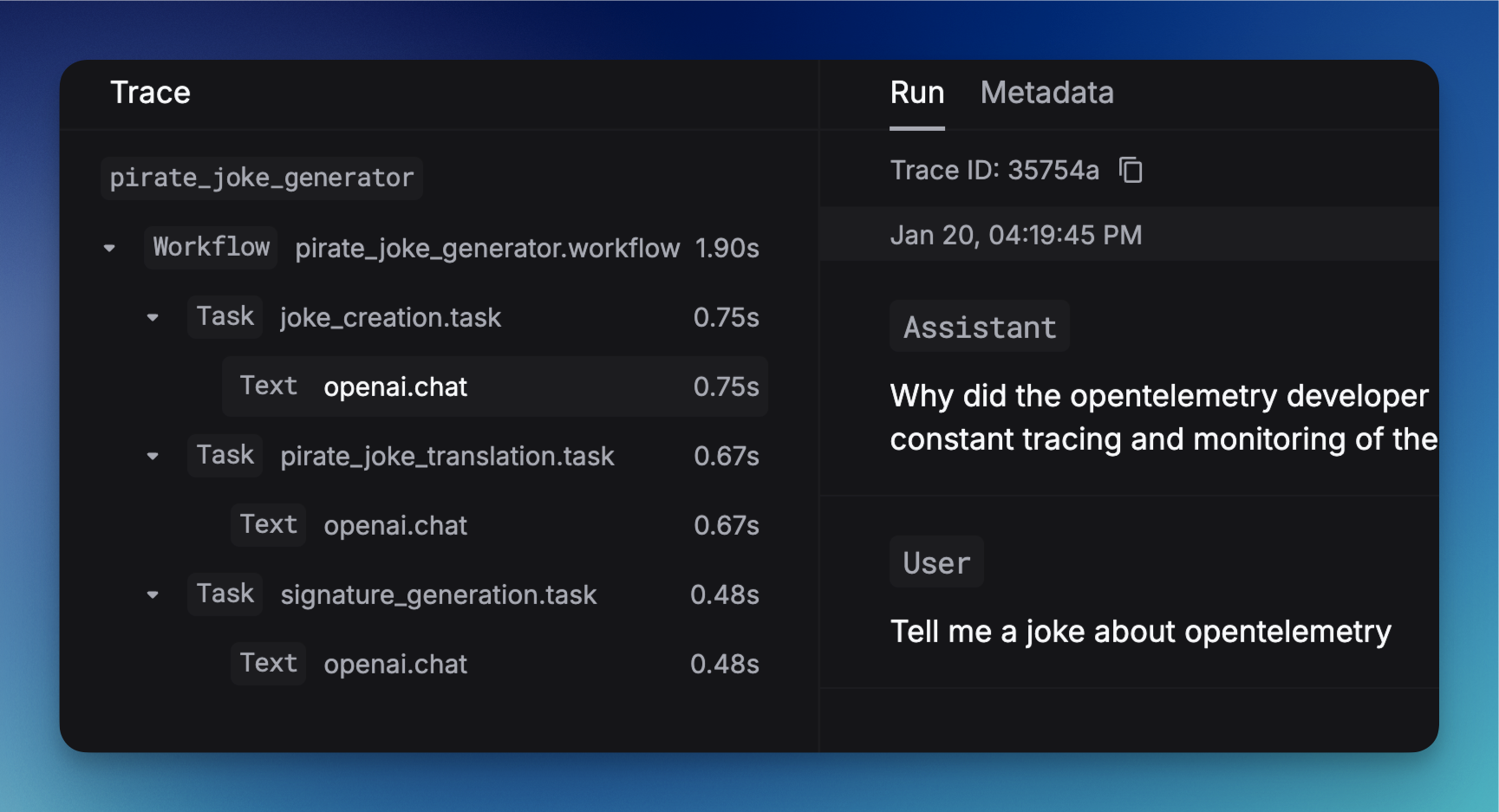
By adding `@workflow` and `@task` decorators to your functions and classes, you can automatically capture detailed execution traces that show the complete hierarchy of your LLM operations.
 ***
## Compatibility
| Integration | Support | Notes |
| ---------------------- | ------- | --------------------------------------------------------------------------------------------------------------------------------- |
| **Keywords AI Native** | ✅ | Built-in tracing with Keywords AI SDK |
| **OpenAI SDK** | ✅ | Python only |
| **OpenAI Agents SDK** | ❌ | Use trace processors instead - see [OpenAI Agents SDK integration](/integration/development-frameworks/tracing/openai-agents-sdk) |
| **Vercel AI SDK** | ❌ | Not currently supported |
***
## Integration
Make sure if have everything ready before you start.
### Implementation
#### Annotate your workflows
Use the `@workflow` and `@task` decorators to instrument your code:
```python Python theme={"system"}
from keywordsai_tracing.decorators import workflow, task
from keywordsai_tracing.main import KeywordsAITelemetry
k_tl = KeywordsAITelemetry()
@workflow(name="my_workflow")
def my_workflow():
@task(name="my_task")
def my_task():
# Your task logic here
pass
my_task()
```
```typescript JavaScript theme={"system"}
import { KeywordsAITelemetry } from '@keywordsai/tracing';
const keywordsAi = new KeywordsAITelemetry({
apiKey: process.env.KEYWORDSAI_API_KEY || "",
appName: 'my-app'
});
async function myWorkflow() {
return await keywordsAi.withWorkflow(
{ name: 'my_workflow' },
async () => {
const result = await keywordsAi.withTask(
{ name: 'my_task' },
async () => {
// Your task logic here
return "task result";
}
);
return result;
}
);
}
```
#### Full example with LLM calls
This example demonstrates a complete LLM workflow with three sequential tasks:
1. **Joke Creation** (`joke_creation`): Generates an original joke about OpenTelemetry using GPT-3.5-turbo
2. **Pirate Translation** (`pirate_joke_translation`): Transforms the joke into pirate language
3. **Signature Generation** (`signature_generation`): Adds a creative signature to the final pirate joke
The `@workflow` decorator wraps the entire process, while each `@task` decorator instruments individual LLM operations.
```python Python theme={"system"}
from openai import OpenAI
from keywordsai_tracing.decorators import workflow, task
from keywordsai_tracing.main import KeywordsAITelemetry
k_tl = KeywordsAITelemetry()
client = OpenAI()
@task(name="joke_creation")
def create_joke():
completion = client.chat.completions.create(
model="gpt-3.5-turbo",
messages=[{"role": "user", "content": "Tell me a joke about opentelemetry"}],
temperature=0.5,
max_tokens=100,
frequency_penalty=0.5,
presence_penalty=0.5,
stop=["\n"],
logprobs=True,
)
return completion.choices[0].message.content
@task(name="signature_generation")
def generate_signature(joke: str):
completion = client.chat.completions.create(
model="gpt-3.5-turbo",
messages=[
{"role": "user", "content": "add a signature to the joke:\n\n" + joke}
],
)
return completion.choices[0].message.content
@task(name="pirate_joke_translation")
def translate_joke_to_pirate(joke: str):
completion = client.chat.completions.create(
model="gpt-3.5-turbo",
messages=[
{
"role": "user",
"content": "translate the joke to pirate language:\n\n" + joke,
}
],
)
return completion.choices[0].message.content
@workflow(name="joke_workflow")
def joke_workflow():
joke = create_joke()
pirate_joke = translate_joke_to_pirate(joke)
signature = generate_signature(pirate_joke)
return signature
# Run the workflow
result = joke_workflow()
print(result)
```
```typescript JavaScript theme={"system"}
import { KeywordsAITelemetry } from '@keywordsai/tracing';
import OpenAI from 'openai';
const keywordsAi = new KeywordsAITelemetry({
apiKey: process.env.KEYWORDSAI_API_KEY || "",
appName: 'joke-app'
});
const openai = new OpenAI();
async function createJoke() {
return await keywordsAi.withTask(
{ name: 'joke_creation' },
async () => {
const completion = await openai.chat.completions.create({
messages: [{ role: 'user', content: 'Tell me a joke about opentelemetry' }],
model: 'gpt-3.5-turbo',
temperature: 0.5,
max_tokens: 100,
stop: ["\n"]
});
return completion.choices[0].message.content;
}
);
}
async function generateSignature(joke: string) {
return await keywordsAi.withTask(
{ name: 'signature_generation' },
async () => {
const completion = await openai.chat.completions.create({
messages: [
{ role: 'user', content: `add a signature to the joke:\n\n${joke}` }
],
model: 'gpt-3.5-turbo'
});
return completion.choices[0].message.content;
}
);
}
async function translateJokeToPirate(joke: string) {
return await keywordsAi.withTask(
{ name: 'pirate_joke_translation' },
async () => {
const completion = await openai.chat.completions.create({
messages: [
{
role: 'user',
content: `translate the joke to pirate language:\n\n${joke}`
}
],
model: 'gpt-3.5-turbo'
});
return completion.choices[0].message.content;
}
);
}
async function jokeWorkflow() {
return await keywordsAi.withWorkflow(
{ name: 'joke_workflow' },
async () => {
const joke = await createJoke();
const pirateJoke = await translateJokeToPirate(joke);
const signature = await generateSignature(pirateJoke);
return signature;
}
);
}
// Run the workflow
jokeWorkflow().then(console.log);
```
### Decorate classes for object-oriented workflows:
```python Python theme={"system"}
from openai import OpenAI
from keywordsai_tracing import KeywordsAITelemetry
from keywordsai_tracing.decorators import workflow, task
k_tl = KeywordsAITelemetry()
client = OpenAI()
@workflow(name="joke_agent", method_name="run")
class JokeAgent:
@task(name="joke_creation")
def create_joke(self):
completion = client.chat.completions.create(
model="gpt-3.5-turbo",
messages=[{"role": "user", "content": "Tell me a joke about opentelemetry"}],
)
joke = completion.choices[0].message.content
return joke
def run(self):
return self.create_joke()
# Usage
agent = JokeAgent()
result = agent.run()
```
```typescript JavaScript theme={"system"}
// Class-based approach using TypeScript classes
import { KeywordsAITelemetry } from '@keywordsai/tracing';
import OpenAI from 'openai';
const keywordsAi = new KeywordsAITelemetry({
apiKey: process.env.KEYWORDSAI_API_KEY || "",
appName: 'joke-app'
});
const openai = new OpenAI();
class JokeAgent {
async createJoke() {
return await keywordsAi.withTask(
{ name: 'joke_creation' },
async () => {
const completion = await openai.chat.completions.create({
messages: [{ role: 'user', content: 'Tell me a joke about opentelemetry' }],
model: 'gpt-3.5-turbo'
});
return completion.choices[0].message.content;
}
);
}
async run() {
return await keywordsAi.withWorkflow(
{ name: 'joke_agent' },
async () => {
return await this.createJoke();
}
);
}
}
// Usage
const agent = new JokeAgent();
agent.run().then(console.log);
```
## How to see this in the platform
Once you've implemented decorators in your code and executed your workflows, you can view the traces in the Keywords AI platform:
### Accessing traces
1. Navigate to the [Traces page](https://platform.keywordsai.co/platform/traces) in your Keywords AI dashboard
2. You'll see a list of all your traced workflows and tasks
### Understanding the trace view
* **Workflow overview**: See the complete execution flow of your decorated workflows
* **Task breakdown**: View individual tasks within each workflow, including execution time and status
* **LLM call details**: Inspect the actual requests and responses for each LLM operation
* **Performance metrics**: Analyze latency, token usage, and costs for each operation
* **Error tracking**: Identify and debug failures in your workflows
### Example trace visualization
The trace view shows:
* The parent workflow (e.g., `joke_workflow`, `vercel_ai_workflow`, `openai_workflow`)
* Individual tasks (e.g., `joke_creation`, `generate_text`, `researcher_agent`)
* Execution timeline and dependencies
* LLM call metadata and performance metrics
***
## Compatibility
| Integration | Support | Notes |
| ---------------------- | ------- | --------------------------------------------------------------------------------------------------------------------------------- |
| **Keywords AI Native** | ✅ | Built-in tracing with Keywords AI SDK |
| **OpenAI SDK** | ✅ | Python only |
| **OpenAI Agents SDK** | ❌ | Use trace processors instead - see [OpenAI Agents SDK integration](/integration/development-frameworks/tracing/openai-agents-sdk) |
| **Vercel AI SDK** | ❌ | Not currently supported |
***
## Integration
Make sure if have everything ready before you start.
### Implementation
#### Annotate your workflows
Use the `@workflow` and `@task` decorators to instrument your code:
```python Python theme={"system"}
from keywordsai_tracing.decorators import workflow, task
from keywordsai_tracing.main import KeywordsAITelemetry
k_tl = KeywordsAITelemetry()
@workflow(name="my_workflow")
def my_workflow():
@task(name="my_task")
def my_task():
# Your task logic here
pass
my_task()
```
```typescript JavaScript theme={"system"}
import { KeywordsAITelemetry } from '@keywordsai/tracing';
const keywordsAi = new KeywordsAITelemetry({
apiKey: process.env.KEYWORDSAI_API_KEY || "",
appName: 'my-app'
});
async function myWorkflow() {
return await keywordsAi.withWorkflow(
{ name: 'my_workflow' },
async () => {
const result = await keywordsAi.withTask(
{ name: 'my_task' },
async () => {
// Your task logic here
return "task result";
}
);
return result;
}
);
}
```
#### Full example with LLM calls
This example demonstrates a complete LLM workflow with three sequential tasks:
1. **Joke Creation** (`joke_creation`): Generates an original joke about OpenTelemetry using GPT-3.5-turbo
2. **Pirate Translation** (`pirate_joke_translation`): Transforms the joke into pirate language
3. **Signature Generation** (`signature_generation`): Adds a creative signature to the final pirate joke
The `@workflow` decorator wraps the entire process, while each `@task` decorator instruments individual LLM operations.
```python Python theme={"system"}
from openai import OpenAI
from keywordsai_tracing.decorators import workflow, task
from keywordsai_tracing.main import KeywordsAITelemetry
k_tl = KeywordsAITelemetry()
client = OpenAI()
@task(name="joke_creation")
def create_joke():
completion = client.chat.completions.create(
model="gpt-3.5-turbo",
messages=[{"role": "user", "content": "Tell me a joke about opentelemetry"}],
temperature=0.5,
max_tokens=100,
frequency_penalty=0.5,
presence_penalty=0.5,
stop=["\n"],
logprobs=True,
)
return completion.choices[0].message.content
@task(name="signature_generation")
def generate_signature(joke: str):
completion = client.chat.completions.create(
model="gpt-3.5-turbo",
messages=[
{"role": "user", "content": "add a signature to the joke:\n\n" + joke}
],
)
return completion.choices[0].message.content
@task(name="pirate_joke_translation")
def translate_joke_to_pirate(joke: str):
completion = client.chat.completions.create(
model="gpt-3.5-turbo",
messages=[
{
"role": "user",
"content": "translate the joke to pirate language:\n\n" + joke,
}
],
)
return completion.choices[0].message.content
@workflow(name="joke_workflow")
def joke_workflow():
joke = create_joke()
pirate_joke = translate_joke_to_pirate(joke)
signature = generate_signature(pirate_joke)
return signature
# Run the workflow
result = joke_workflow()
print(result)
```
```typescript JavaScript theme={"system"}
import { KeywordsAITelemetry } from '@keywordsai/tracing';
import OpenAI from 'openai';
const keywordsAi = new KeywordsAITelemetry({
apiKey: process.env.KEYWORDSAI_API_KEY || "",
appName: 'joke-app'
});
const openai = new OpenAI();
async function createJoke() {
return await keywordsAi.withTask(
{ name: 'joke_creation' },
async () => {
const completion = await openai.chat.completions.create({
messages: [{ role: 'user', content: 'Tell me a joke about opentelemetry' }],
model: 'gpt-3.5-turbo',
temperature: 0.5,
max_tokens: 100,
stop: ["\n"]
});
return completion.choices[0].message.content;
}
);
}
async function generateSignature(joke: string) {
return await keywordsAi.withTask(
{ name: 'signature_generation' },
async () => {
const completion = await openai.chat.completions.create({
messages: [
{ role: 'user', content: `add a signature to the joke:\n\n${joke}` }
],
model: 'gpt-3.5-turbo'
});
return completion.choices[0].message.content;
}
);
}
async function translateJokeToPirate(joke: string) {
return await keywordsAi.withTask(
{ name: 'pirate_joke_translation' },
async () => {
const completion = await openai.chat.completions.create({
messages: [
{
role: 'user',
content: `translate the joke to pirate language:\n\n${joke}`
}
],
model: 'gpt-3.5-turbo'
});
return completion.choices[0].message.content;
}
);
}
async function jokeWorkflow() {
return await keywordsAi.withWorkflow(
{ name: 'joke_workflow' },
async () => {
const joke = await createJoke();
const pirateJoke = await translateJokeToPirate(joke);
const signature = await generateSignature(pirateJoke);
return signature;
}
);
}
// Run the workflow
jokeWorkflow().then(console.log);
```
### Decorate classes for object-oriented workflows:
```python Python theme={"system"}
from openai import OpenAI
from keywordsai_tracing import KeywordsAITelemetry
from keywordsai_tracing.decorators import workflow, task
k_tl = KeywordsAITelemetry()
client = OpenAI()
@workflow(name="joke_agent", method_name="run")
class JokeAgent:
@task(name="joke_creation")
def create_joke(self):
completion = client.chat.completions.create(
model="gpt-3.5-turbo",
messages=[{"role": "user", "content": "Tell me a joke about opentelemetry"}],
)
joke = completion.choices[0].message.content
return joke
def run(self):
return self.create_joke()
# Usage
agent = JokeAgent()
result = agent.run()
```
```typescript JavaScript theme={"system"}
// Class-based approach using TypeScript classes
import { KeywordsAITelemetry } from '@keywordsai/tracing';
import OpenAI from 'openai';
const keywordsAi = new KeywordsAITelemetry({
apiKey: process.env.KEYWORDSAI_API_KEY || "",
appName: 'joke-app'
});
const openai = new OpenAI();
class JokeAgent {
async createJoke() {
return await keywordsAi.withTask(
{ name: 'joke_creation' },
async () => {
const completion = await openai.chat.completions.create({
messages: [{ role: 'user', content: 'Tell me a joke about opentelemetry' }],
model: 'gpt-3.5-turbo'
});
return completion.choices[0].message.content;
}
);
}
async run() {
return await keywordsAi.withWorkflow(
{ name: 'joke_agent' },
async () => {
return await this.createJoke();
}
);
}
}
// Usage
const agent = new JokeAgent();
agent.run().then(console.log);
```
## How to see this in the platform
Once you've implemented decorators in your code and executed your workflows, you can view the traces in the Keywords AI platform:
### Accessing traces
1. Navigate to the [Traces page](https://platform.keywordsai.co/platform/traces) in your Keywords AI dashboard
2. You'll see a list of all your traced workflows and tasks
### Understanding the trace view
* **Workflow overview**: See the complete execution flow of your decorated workflows
* **Task breakdown**: View individual tasks within each workflow, including execution time and status
* **LLM call details**: Inspect the actual requests and responses for each LLM operation
* **Performance metrics**: Analyze latency, token usage, and costs for each operation
* **Error tracking**: Identify and debug failures in your workflows
### Example trace visualization
The trace view shows:
* The parent workflow (e.g., `joke_workflow`, `vercel_ai_workflow`, `openai_workflow`)
* Individual tasks (e.g., `joke_creation`, `generate_text`, `researcher_agent`)
* Execution timeline and dependencies
* LLM call metadata and performance metrics