> ## Documentation Index
> Fetch the complete documentation index at: https://docs.keywordsai.co/llms.txt
> Use this file to discover all available pages before exploring further.
# Claude Code
> Trace your Claude Code (Anthropic CLI) conversations with Keywords AI for full observability into thinking, tool calls, and agent workflows.
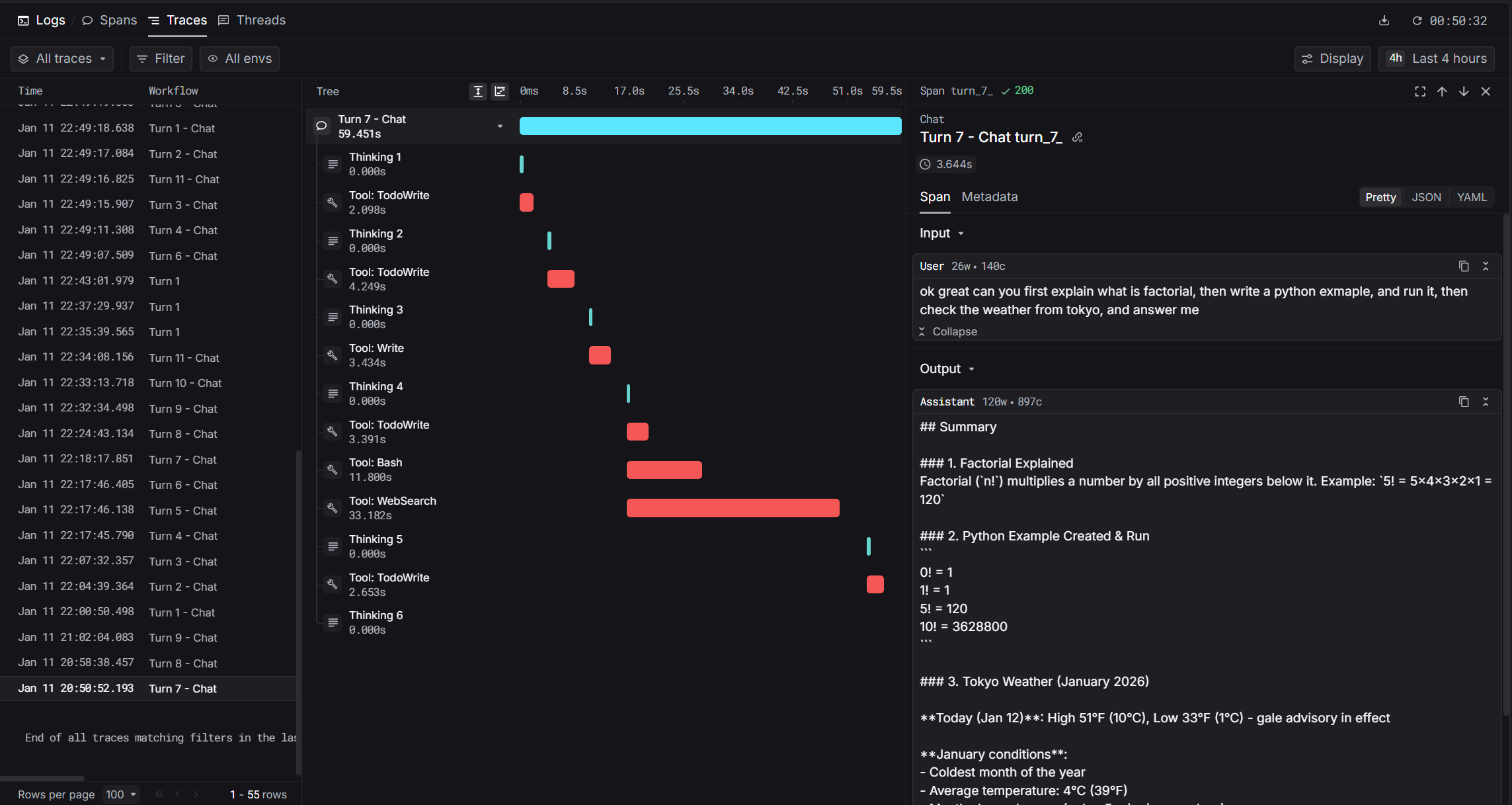 [Claude Code](https://docs.anthropic.com/en/docs/claude-code) is Anthropic's agentic coding tool that lives in your terminal. With Keywords AI integration, you get hierarchical traces of every conversation including thinking blocks, tool calls, and token usage.
## How It Works
Claude Code stores conversation transcripts as JSONL files. Our integration uses the `Stop` hook to parse these transcripts and send structured traces to Keywords AI.
```mermaid theme={"system"}
sequenceDiagram
participant User
participant Claude as Claude Code
participant Transcript as JSONL Transcript
participant Hook as Keywords AI Hook
participant API as Keywords AI API
User->>Claude: Submit prompt
Claude->>Transcript: Log messages (thinking, tools, response)
Claude->>User: Display response
Claude->>Hook: Stop hook triggers
Transcript-->>Hook: Read new messages
Hook->>API: Send spans
```
For details on trace structure and span types, see the [Observability Data Model](/get-started/observability_data_model).
## Prerequisites
* [Claude Code](https://docs.anthropic.com/en/docs/claude-code) installed (`npm install -g @anthropic-ai/claude-code`)
* [Keywords AI API key](https://platform.keywordsai.co)
* Python 3.8+ with `requests` library
## Installation
### 1. Set Environment Variables
Add these to your shell profile (`.bashrc`, `.zshrc`, or PowerShell `$PROFILE`):
```bash Bash/Zsh theme={"system"}
export KEYWORDSAI_API_KEY="your-api-key"
export TRACE_TO_KEYWORDSAI="true"
# Optional: Enterprise endpoint (default: api.keywordsai.co)
# export KEYWORDSAI_BASE_URL="https://endpoint.keywordsai.co/api"
# Optional: Enable debug logging
# export CC_KEYWORDSAI_DEBUG="true"
```
```powershell PowerShell theme={"system"}
$env:KEYWORDSAI_API_KEY = "your-api-key"
$env:TRACE_TO_KEYWORDSAI = "true"
# Optional: Enterprise endpoint (default: api.keywordsai.co)
# $env:KEYWORDSAI_BASE_URL = "https://endpoint.keywordsai.co/api"
# Optional: Enable debug logging
# $env:CC_KEYWORDSAI_DEBUG = "true"
```
### 2. Download the Hook Script
Download the hook script to your Claude Code hooks directory:
```bash Bash/Zsh theme={"system"}
mkdir -p ~/.claude/hooks
curl -o ~/.claude/hooks/keywordsai_hook.py \
https://raw.githubusercontent.com/Keywords-AI/keywordsai-example-projects/main/example_scripts/python/claude_code/keywordsai_hook.py
```
```powershell PowerShell theme={"system"}
New-Item -ItemType Directory -Force -Path "$env:USERPROFILE\.claude\hooks"
Invoke-WebRequest -Uri "https://raw.githubusercontent.com/Keywords-AI/keywordsai-example-projects/main/example_scripts/python/claude_code/keywordsai_hook.py" -OutFile "$env:USERPROFILE\.claude\hooks\keywordsai_hook.py"
```
### 3. Configure Claude Code Settings
Add the hook to your Claude Code settings at `~/.claude/settings.json`:
```json macOS/Linux theme={"system"}
{
"hooks": {
"Stop": [
{
"hooks": [
{
"type": "command",
"command": "python ~/.claude/hooks/keywordsai_hook.py"
}
]
}
]
}
}
```
```json Windows theme={"system"}
{
"hooks": {
"Stop": [
{
"hooks": [
{
"type": "command",
"command": "python \"%USERPROFILE%\\.claude\\hooks\\keywordsai_hook.py\""
}
]
}
]
}
}
```
If `settings.json` already exists, merge the `hooks` section with your existing configuration.
### 4. Enable Per-Project (Optional)
To enable tracing for specific projects, create `.claude/settings.local.json` in your project directory:
```json theme={"system"}
{
"hooks": {
"Stop": [
{
"hooks": [
{
"type": "command",
"command": "python ~/.claude/hooks/keywordsai_hook.py"
}
]
}
]
}
}
```
## Captured Data
The integration captures rich metadata from Claude Code transcripts:
| Data | Description |
| ---------------------- | --------------------------------------------- |
| **User prompt** | The user's input text |
| **Assistant response** | Claude's final response |
| **Thinking blocks** | Extended thinking content |
| **Tool calls** | Tool name, input, and output |
| **Token usage** | Input, output, and cache tokens |
| **Timing** | Start time, end time, latency |
| **Model** | Model name (e.g., `claude-sonnet-4-20250514`) |
## Span Types
| Span | `log_type` | Description |
| -------- | ------------ | ------------------------------------------ |
| Root | `agent` | The complete conversation turn |
| Thinking | `generation` | Extended thinking blocks |
| Tool | `tool` | Tool invocations (Read, Write, Bash, etc.) |
## Trace Fields
| Field | Value | Description |
| ------------------------------ | ------------------------- | --------------------------- |
| `trace_unique_id` | `{session_id}_turn_{N}` | Unique per turn |
| `span_workflow_name` | `claudecode_{session_id}` | Groups all turns in session |
| `thread_identifier` | `claudecode_{session_id}` | Links turns in Threads view |
| `prompt_tokens` | From usage | Input token count |
| `completion_tokens` | From usage | Output token count |
| `cache_creation_prompt_tokens` | From usage | Cache creation tokens |
## Debugging
Check the log file for issues:
```bash Bash/Zsh theme={"system"}
tail -f ~/.claude/state/keywordsai_hook.log
```
```powershell PowerShell theme={"system"}
Get-Content "$env:USERPROFILE\.claude\state\keywordsai_hook.log" -Tail 50 -Wait
```
### State File
The hook tracks processed turns in `~/.claude/state/keywordsai_state.json`:
```json theme={"system"}
{
"session-abc123": {
"last_line": 42,
"turn_count": 5,
"updated": "2026-01-11T22:49:26Z"
}
}
```
Delete this file to reprocess all turns.
### Common Issues
| Issue | Solution |
| ------------------- | -------------------------------------------------- |
| No traces appearing | Check `TRACE_TO_KEYWORDSAI=true` is set |
| API errors | Verify `KEYWORDSAI_API_KEY` is correct |
| Missing thinking | Ensure extended thinking is enabled in Claude Code |
| Duplicate traces | Clear state file to reset |
## Example Output
After setup, you'll see traces in Keywords AI with full hierarchy:
```
claudecode_abc123_turn_1 (2.5s)
├── Thinking 1 (0.8s) - "Let me read the file first..."
├── Tool: Read (0.1s) - {"path": "main.py"}
├── Thinking 2 (0.5s) - "I see the issue..."
├── Tool: Write (0.1s) - {"path": "main.py", "content": "..."}
└── Token usage: 1,234 prompt / 567 completion
```
## Comparison with Cursor Integration
| Feature | Cursor | Claude Code |
| ----------- | ------------------------ | -------------------------- |
| Hook type | Multiple real-time hooks | Single `Stop` hook |
| Data source | JSON via stdin | JSONL transcript files |
| Timing | Real-time | Post-hoc (after response) |
| Token usage | Not available | Full usage details |
| Cache info | Not available | Cache creation/read tokens |
## Source Code
The full source code is available on GitHub: [Keywords-AI/keywordsai-example-projects/claude\_code](https://github.com/Keywords-AI/keywordsai-example-projects/tree/main/example_scripts/python/claude_code)
## References
* [Claude Code Documentation](https://docs.anthropic.com/en/docs/claude-code)
* [Keywords AI Traces Ingest API](/api-endpoints/observe/traces/traces-ingest-from-logs)
[Claude Code](https://docs.anthropic.com/en/docs/claude-code) is Anthropic's agentic coding tool that lives in your terminal. With Keywords AI integration, you get hierarchical traces of every conversation including thinking blocks, tool calls, and token usage.
## How It Works
Claude Code stores conversation transcripts as JSONL files. Our integration uses the `Stop` hook to parse these transcripts and send structured traces to Keywords AI.
```mermaid theme={"system"}
sequenceDiagram
participant User
participant Claude as Claude Code
participant Transcript as JSONL Transcript
participant Hook as Keywords AI Hook
participant API as Keywords AI API
User->>Claude: Submit prompt
Claude->>Transcript: Log messages (thinking, tools, response)
Claude->>User: Display response
Claude->>Hook: Stop hook triggers
Transcript-->>Hook: Read new messages
Hook->>API: Send spans
```
For details on trace structure and span types, see the [Observability Data Model](/get-started/observability_data_model).
## Prerequisites
* [Claude Code](https://docs.anthropic.com/en/docs/claude-code) installed (`npm install -g @anthropic-ai/claude-code`)
* [Keywords AI API key](https://platform.keywordsai.co)
* Python 3.8+ with `requests` library
## Installation
### 1. Set Environment Variables
Add these to your shell profile (`.bashrc`, `.zshrc`, or PowerShell `$PROFILE`):
```bash Bash/Zsh theme={"system"}
export KEYWORDSAI_API_KEY="your-api-key"
export TRACE_TO_KEYWORDSAI="true"
# Optional: Enterprise endpoint (default: api.keywordsai.co)
# export KEYWORDSAI_BASE_URL="https://endpoint.keywordsai.co/api"
# Optional: Enable debug logging
# export CC_KEYWORDSAI_DEBUG="true"
```
```powershell PowerShell theme={"system"}
$env:KEYWORDSAI_API_KEY = "your-api-key"
$env:TRACE_TO_KEYWORDSAI = "true"
# Optional: Enterprise endpoint (default: api.keywordsai.co)
# $env:KEYWORDSAI_BASE_URL = "https://endpoint.keywordsai.co/api"
# Optional: Enable debug logging
# $env:CC_KEYWORDSAI_DEBUG = "true"
```
### 2. Download the Hook Script
Download the hook script to your Claude Code hooks directory:
```bash Bash/Zsh theme={"system"}
mkdir -p ~/.claude/hooks
curl -o ~/.claude/hooks/keywordsai_hook.py \
https://raw.githubusercontent.com/Keywords-AI/keywordsai-example-projects/main/example_scripts/python/claude_code/keywordsai_hook.py
```
```powershell PowerShell theme={"system"}
New-Item -ItemType Directory -Force -Path "$env:USERPROFILE\.claude\hooks"
Invoke-WebRequest -Uri "https://raw.githubusercontent.com/Keywords-AI/keywordsai-example-projects/main/example_scripts/python/claude_code/keywordsai_hook.py" -OutFile "$env:USERPROFILE\.claude\hooks\keywordsai_hook.py"
```
### 3. Configure Claude Code Settings
Add the hook to your Claude Code settings at `~/.claude/settings.json`:
```json macOS/Linux theme={"system"}
{
"hooks": {
"Stop": [
{
"hooks": [
{
"type": "command",
"command": "python ~/.claude/hooks/keywordsai_hook.py"
}
]
}
]
}
}
```
```json Windows theme={"system"}
{
"hooks": {
"Stop": [
{
"hooks": [
{
"type": "command",
"command": "python \"%USERPROFILE%\\.claude\\hooks\\keywordsai_hook.py\""
}
]
}
]
}
}
```
If `settings.json` already exists, merge the `hooks` section with your existing configuration.
### 4. Enable Per-Project (Optional)
To enable tracing for specific projects, create `.claude/settings.local.json` in your project directory:
```json theme={"system"}
{
"hooks": {
"Stop": [
{
"hooks": [
{
"type": "command",
"command": "python ~/.claude/hooks/keywordsai_hook.py"
}
]
}
]
}
}
```
## Captured Data
The integration captures rich metadata from Claude Code transcripts:
| Data | Description |
| ---------------------- | --------------------------------------------- |
| **User prompt** | The user's input text |
| **Assistant response** | Claude's final response |
| **Thinking blocks** | Extended thinking content |
| **Tool calls** | Tool name, input, and output |
| **Token usage** | Input, output, and cache tokens |
| **Timing** | Start time, end time, latency |
| **Model** | Model name (e.g., `claude-sonnet-4-20250514`) |
## Span Types
| Span | `log_type` | Description |
| -------- | ------------ | ------------------------------------------ |
| Root | `agent` | The complete conversation turn |
| Thinking | `generation` | Extended thinking blocks |
| Tool | `tool` | Tool invocations (Read, Write, Bash, etc.) |
## Trace Fields
| Field | Value | Description |
| ------------------------------ | ------------------------- | --------------------------- |
| `trace_unique_id` | `{session_id}_turn_{N}` | Unique per turn |
| `span_workflow_name` | `claudecode_{session_id}` | Groups all turns in session |
| `thread_identifier` | `claudecode_{session_id}` | Links turns in Threads view |
| `prompt_tokens` | From usage | Input token count |
| `completion_tokens` | From usage | Output token count |
| `cache_creation_prompt_tokens` | From usage | Cache creation tokens |
## Debugging
Check the log file for issues:
```bash Bash/Zsh theme={"system"}
tail -f ~/.claude/state/keywordsai_hook.log
```
```powershell PowerShell theme={"system"}
Get-Content "$env:USERPROFILE\.claude\state\keywordsai_hook.log" -Tail 50 -Wait
```
### State File
The hook tracks processed turns in `~/.claude/state/keywordsai_state.json`:
```json theme={"system"}
{
"session-abc123": {
"last_line": 42,
"turn_count": 5,
"updated": "2026-01-11T22:49:26Z"
}
}
```
Delete this file to reprocess all turns.
### Common Issues
| Issue | Solution |
| ------------------- | -------------------------------------------------- |
| No traces appearing | Check `TRACE_TO_KEYWORDSAI=true` is set |
| API errors | Verify `KEYWORDSAI_API_KEY` is correct |
| Missing thinking | Ensure extended thinking is enabled in Claude Code |
| Duplicate traces | Clear state file to reset |
## Example Output
After setup, you'll see traces in Keywords AI with full hierarchy:
```
claudecode_abc123_turn_1 (2.5s)
├── Thinking 1 (0.8s) - "Let me read the file first..."
├── Tool: Read (0.1s) - {"path": "main.py"}
├── Thinking 2 (0.5s) - "I see the issue..."
├── Tool: Write (0.1s) - {"path": "main.py", "content": "..."}
└── Token usage: 1,234 prompt / 567 completion
```
## Comparison with Cursor Integration
| Feature | Cursor | Claude Code |
| ----------- | ------------------------ | -------------------------- |
| Hook type | Multiple real-time hooks | Single `Stop` hook |
| Data source | JSON via stdin | JSONL transcript files |
| Timing | Real-time | Post-hoc (after response) |
| Token usage | Not available | Full usage details |
| Cache info | Not available | Cache creation/read tokens |
## Source Code
The full source code is available on GitHub: [Keywords-AI/keywordsai-example-projects/claude\_code](https://github.com/Keywords-AI/keywordsai-example-projects/tree/main/example_scripts/python/claude_code)
## References
* [Claude Code Documentation](https://docs.anthropic.com/en/docs/claude-code)
* [Keywords AI Traces Ingest API](/api-endpoints/observe/traces/traces-ingest-from-logs)