> ## Documentation Index
> Fetch the complete documentation index at: https://docs.keywordsai.co/llms.txt
> Use this file to discover all available pages before exploring further.
# Vercel AI SDK
> Log LLM requests with Keywords AI gateway
This integration is for the **Keywords AI gateway**.
With this integration, your LLM requests will go through **the Keywords AI gateway**, and the requests will be **automatically logged to Keywords AI**.
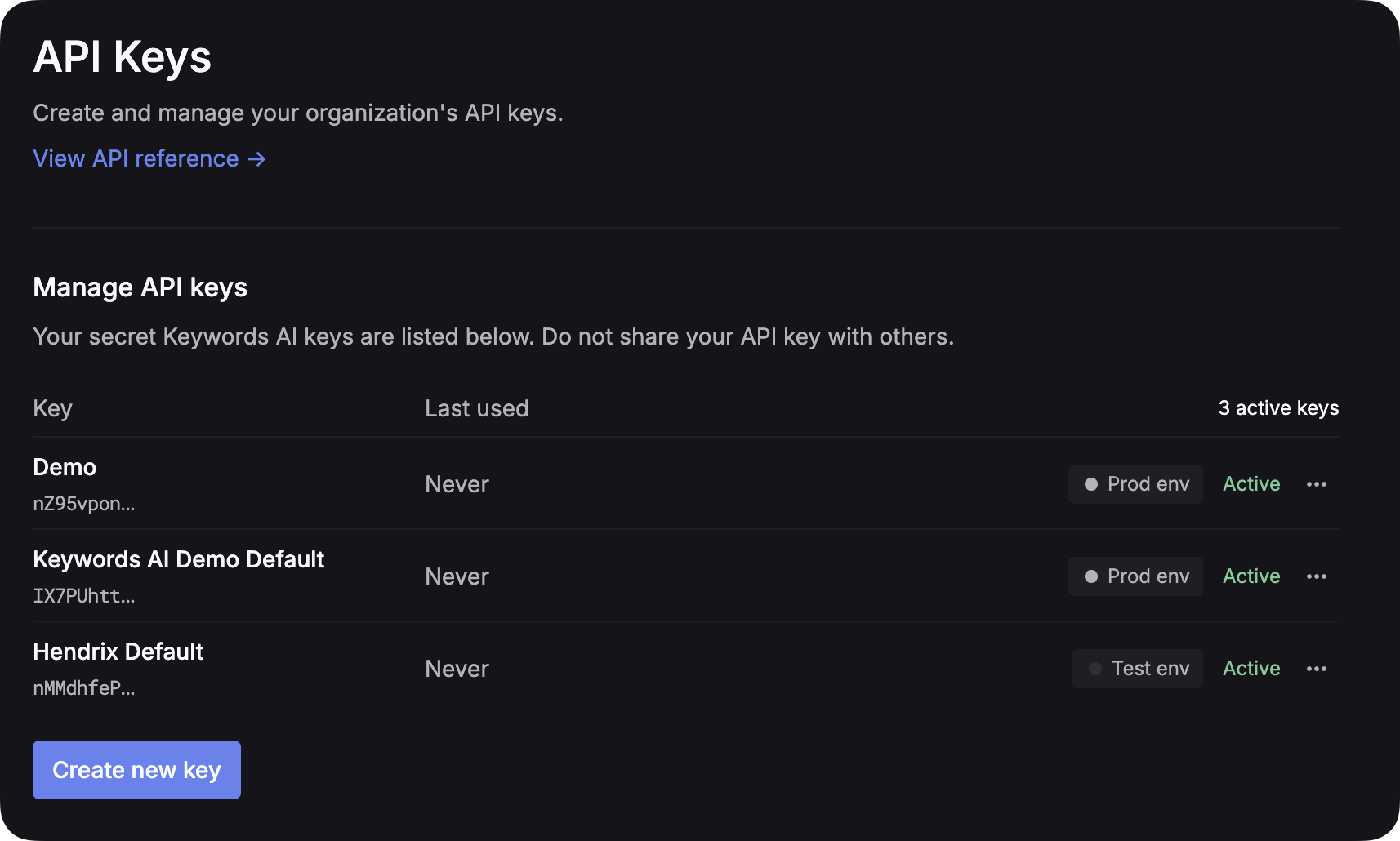
## 1. Get Keywords AI API key
After you create an account on [Keywords AI](https://platform.keywordsai.co), you can get your API key from the [API keys page](https://platform.keywordsai.co/platform/api/api-keys).
 ## 2. Add provider credentials
You have to add your own credentials to activate AI gateway otherwise your LLM calls will cause errors. We will use your credentials to call LLMs on your behalf.
We **won't use your credentials** for any other purposes and no extra charges will be applied.
Go to the [Providers page](https://platform.keywordsai.co/platform/api/providers) to add your credentials.
## 2. Add provider credentials
You have to add your own credentials to activate AI gateway otherwise your LLM calls will cause errors. We will use your credentials to call LLMs on your behalf.
We **won't use your credentials** for any other purposes and no extra charges will be applied.
Go to the [Providers page](https://platform.keywordsai.co/platform/api/providers) to add your credentials.

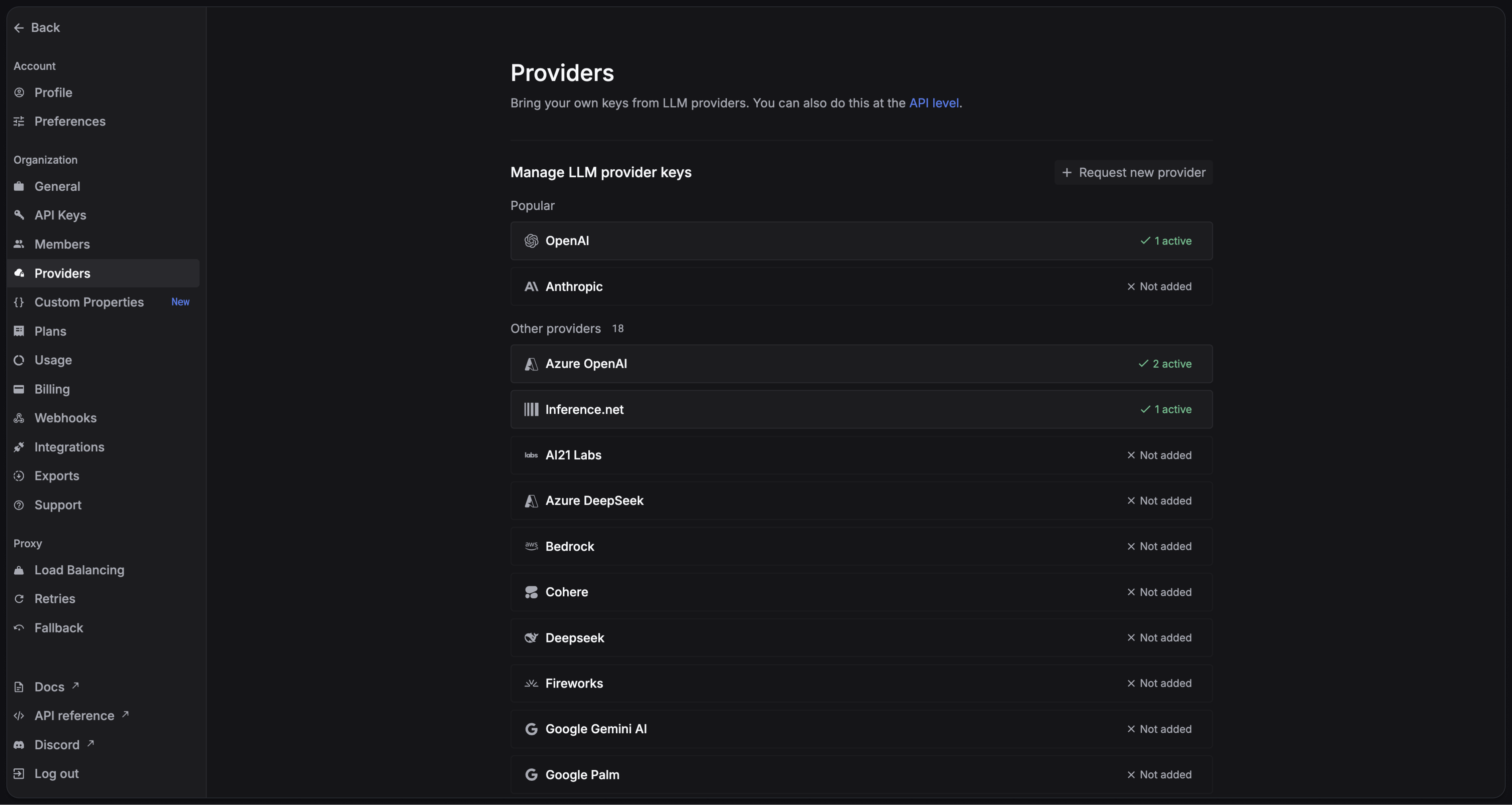 Learn how to add credentials to a specific provider [here](/documentation/admin/llm_provider_keys).
***
## 3. Compatibility at a glance
| SDK helper | Works via Keywords AI? | Switch models? |
| ------------------- | ----------------------------- | -------------- |
| `@ai-sdk/openai` | ✅ Yes | ✅ Yes |
| `@ai-sdk/anthropic` | ✅ Yes (Anthropic models only) | ❌ No |
| `@ai-sdk/google` | ✅ Yes | ✅ Yes |
\*Requires overriding `baseURL` and passing the provider key via `customer_credentials`.
***
## 4. Integrate Keywords AI gateway
Here's an example of how to use the Vercel AI SDK with OpenAI:
```TypeScript OpenAI.tsx theme={"system"}
import { createOpenAI, OpenAIProvider } from '@ai-sdk/openai'
import { streamText, streamObject } from 'ai'
async function main() {
// Initialize OpenAI with Keywords gateways
const client: OpenAIProvider = createOpenAI({
baseURL: 'https://api.keywordsai.co',
apiKey: 'YOUR_KEYWORDS_AI_API_KEY',
compatibility: 'strict',
})
const requestParamsDefault: Parameters[0] = {
model: client.chat('gpt-3.5-turbo'),
messages: [
{
role: 'user',
content: 'Hello! How are you doing today?',
},
],
temperature: 0.5,
}
try {
console.log('Calling OpenAI with Keywords proxy...')
const { textStream: proxyTextStream } = await streamText(requestParamsDefault)
for await (const textPart of proxyTextStream) {
console.log('Keywords Proxy Response:', textPart)
}
} catch (error) {
console.error('Error:', error)
}
}
main()
```
Here is an example of using the Vercel AI SDK with response API.
```typescript TypeScript theme={"system"}
import { streamText, streamObject, generateText, tool } from "ai";
import { createOpenAI, openai } from "@ai-sdk/openai";
import { z } from "zod";
// Keywords AI parameters to be sent in the header
const keywordsAIHeaderContent = {
"customer_identifier": "test_customer_identifier_from_header"
}
const encoded = Buffer.from(JSON.stringify(keywordsAIHeaderContent)).toString('base64');
const client = createOpenAI({
headers: {
"X-Data-Keywordsai-Params": encoded
},
baseURL: "https://api.keywordsai.co/api",
apiKey: process.env.KEYWORDSAI_API_KEY,
});
const result = await generateText({
model: client.responses('gpt-4o-mini'),
prompt: 'What happened in San Francisco last week?',
tools: {
web_search_preview: client.tools.webSearchPreview({
searchContextSize: 'high',
userLocation: {
type: 'approximate',
city: 'San Francisco',
region: 'California',
},
}),
},
});
console.log(result.text);
console.log(result.sources);
```
You can find the full source code for this example on GitHub: [TypeScript Example](https://github.com/Keywords-AI/keywordsai-example-projects/blob/main/example_scripts/typescript/vercel_sdk_example.ts)
Here's an example of how to use the Vercel AI SDK with Anthropic:
```TypeScript Anthropic.tsx theme={"system"}
import { createAnthropic } from '@ai-sdk/anthropic';
import { streamText, convertToCoreMessages } from 'ai';
// Allow streaming responses up to 30 seconds
export const maxDuration = 30;
export const anthropic: AnthropicProvider = createAnthropic({
baseURL: "https://api.keywordsai.co/api/anthropic/v1",
apiKey: process.env.KEYWORDS_AI_API_KEY,
});
export async function POST(req: Request) {
const { messages } = await req.json();
const result = await streamText({
model: anthropic('claude-3-5-sonnet-20240620'), // choose any model
messages: convertToCoreMessages(messages),
});
return result.toDataStreamResponse();
}
```
Here's an example of how to use the Vercel AI SDK with Google Gemini:
```TypeScript Google Gemini.tsx theme={"system"}
import {
createGoogleGenerativeAI,
GoogleGenerativeAIProviderOptions,
} from "@ai-sdk/google";
import { generateText, streamText } from "ai";
const url = `https://api.keywordsai.co/api/google/`;
const google = createGoogleGenerativeAI({
// custom settings
baseURL: url,
apiKey: process.env.KEYWORDSAI_API_KEY,
});
const { text } = await generateText({
model: google("gemini-2.0-flash"),
providerOptions: {
google: {
responseModalities: ["TEXT", "IMAGE"],
} satisfies GoogleGenerativeAIProviderOptions,
},
prompt: "Hello, how are you?",
temperature: 0.5,
});
```
## 5. Add Keywords AI parameters
Adding Keywords AI parameters to the Vercel AI SDK is different than other frameworks. Here is an example of how to do it:
You should create an object with the Keywords AI parameters you want to use. Add parameters you want to use as keys in the object.
```typescript theme={"system"}
const keywordsAIHeaderContent = {
"customer_params": {
"customer_identifier": "customer_123",
"name": "Hendrix Liu", //optional
"email": "hendrix@keywordsai.co" //optional
}
// "cache_enabled": true or other parameters
}
```
You should encode the object as a string and then you can send it as a header in your request.
```typescript theme={"system"}
const encoded = Buffer.from(JSON.stringify(keywordsAIHeaderContent)).toString('base64');
```
You should send it in the `X-Data-Keywordsai-Params` header.
```typescript OpenAI theme={"system"}
const client = createOpenAI({
baseURL: process.env.KEYWORDSAI_ENDPOINT_LOCAL,
apiKey: process.env.KEYWORDSAI_API_KEY_TEST,
compatibility: "strict",
headers: {
"X-Data-Keywordsai-Params": encoded
}
});
```
```typescript Anthropic theme={"system"}
const client = createAnthropic({
baseURL: process.env.KEYWORDSAI_ENDPOINT_LOCAL,
apiKey: process.env.KEYWORDSAI_API_KEY_TEST,
headers: {
"X-Data-Keywordsai-Params": encoded
}
});
```
```typescript OpenAI theme={"system"}
import { streamText, streamObject } from "ai";
import { createOpenAI } from "@ai-sdk/openai";
const keywordsAIHeaderContent = {
"customer_identifier": "test_customer_identifier_from_header"
}
const encoded = Buffer.from(JSON.stringify(keywordsAIHeaderContent)).toString('base64');
const client = createOpenAI({
baseURL: process.env.KEYWORDSAI_ENDPOINT_LOCAL,
apiKey: process.env.KEYWORDSAI_API_KEY_TEST,
compatibility: "strict",
headers: {
"X-Data-Keywordsai-Params": encoded
}
});
const requestParamsDefault: Parameters[0] = {
model: client.chat("gpt-4o"),
messages: [
{
role: "user",
content: "Hello! How are you doing today?",
},
],
temperature: 0.5,
};
try {
console.log("Calling OpenAI with Keywords proxy...");
const { textStream: proxyTextStream } = await streamText(
requestParamsDefault
);
for await (const textPart of proxyTextStream) {
console.log("Keywords Proxy Response:", textPart);
}
} catch (error) {
console.error("Error:", error);
}
```
```typescript Anthropic theme={"system"}
import { createAnthropic } from '@ai-sdk/anthropic';
import { streamText, convertToCoreMessages } from 'ai';
const keywordsAIHeaderContent = {
"customer_identifier": "test_customer_identifier_from_header"
}
const encoded = Buffer.from(JSON.stringify(keywordsAIHeaderContent)).toString('base64');
const anthropic = createAnthropic({
baseURL: process.env.KEYWORDSAI_ENDPOINT_LOCAL,
apiKey: process.env.KEYWORDSAI_API_KEY_TEST,
headers: {
"X-Data-Keywordsai-Params": encoded
}
});
export async function POST(req: Request) {
const { messages } = await req.json();
const result = await streamText({
model: anthropic('claude-3-5-sonnet-20240620'), // choose any model
messages: convertToCoreMessages(messages),
});
return result.toDataStreamResponse();
}
```
Learn how to add credentials to a specific provider [here](/documentation/admin/llm_provider_keys).
***
## 3. Compatibility at a glance
| SDK helper | Works via Keywords AI? | Switch models? |
| ------------------- | ----------------------------- | -------------- |
| `@ai-sdk/openai` | ✅ Yes | ✅ Yes |
| `@ai-sdk/anthropic` | ✅ Yes (Anthropic models only) | ❌ No |
| `@ai-sdk/google` | ✅ Yes | ✅ Yes |
\*Requires overriding `baseURL` and passing the provider key via `customer_credentials`.
***
## 4. Integrate Keywords AI gateway
Here's an example of how to use the Vercel AI SDK with OpenAI:
```TypeScript OpenAI.tsx theme={"system"}
import { createOpenAI, OpenAIProvider } from '@ai-sdk/openai'
import { streamText, streamObject } from 'ai'
async function main() {
// Initialize OpenAI with Keywords gateways
const client: OpenAIProvider = createOpenAI({
baseURL: 'https://api.keywordsai.co',
apiKey: 'YOUR_KEYWORDS_AI_API_KEY',
compatibility: 'strict',
})
const requestParamsDefault: Parameters[0] = {
model: client.chat('gpt-3.5-turbo'),
messages: [
{
role: 'user',
content: 'Hello! How are you doing today?',
},
],
temperature: 0.5,
}
try {
console.log('Calling OpenAI with Keywords proxy...')
const { textStream: proxyTextStream } = await streamText(requestParamsDefault)
for await (const textPart of proxyTextStream) {
console.log('Keywords Proxy Response:', textPart)
}
} catch (error) {
console.error('Error:', error)
}
}
main()
```
Here is an example of using the Vercel AI SDK with response API.
```typescript TypeScript theme={"system"}
import { streamText, streamObject, generateText, tool } from "ai";
import { createOpenAI, openai } from "@ai-sdk/openai";
import { z } from "zod";
// Keywords AI parameters to be sent in the header
const keywordsAIHeaderContent = {
"customer_identifier": "test_customer_identifier_from_header"
}
const encoded = Buffer.from(JSON.stringify(keywordsAIHeaderContent)).toString('base64');
const client = createOpenAI({
headers: {
"X-Data-Keywordsai-Params": encoded
},
baseURL: "https://api.keywordsai.co/api",
apiKey: process.env.KEYWORDSAI_API_KEY,
});
const result = await generateText({
model: client.responses('gpt-4o-mini'),
prompt: 'What happened in San Francisco last week?',
tools: {
web_search_preview: client.tools.webSearchPreview({
searchContextSize: 'high',
userLocation: {
type: 'approximate',
city: 'San Francisco',
region: 'California',
},
}),
},
});
console.log(result.text);
console.log(result.sources);
```
You can find the full source code for this example on GitHub: [TypeScript Example](https://github.com/Keywords-AI/keywordsai-example-projects/blob/main/example_scripts/typescript/vercel_sdk_example.ts)
Here's an example of how to use the Vercel AI SDK with Anthropic:
```TypeScript Anthropic.tsx theme={"system"}
import { createAnthropic } from '@ai-sdk/anthropic';
import { streamText, convertToCoreMessages } from 'ai';
// Allow streaming responses up to 30 seconds
export const maxDuration = 30;
export const anthropic: AnthropicProvider = createAnthropic({
baseURL: "https://api.keywordsai.co/api/anthropic/v1",
apiKey: process.env.KEYWORDS_AI_API_KEY,
});
export async function POST(req: Request) {
const { messages } = await req.json();
const result = await streamText({
model: anthropic('claude-3-5-sonnet-20240620'), // choose any model
messages: convertToCoreMessages(messages),
});
return result.toDataStreamResponse();
}
```
Here's an example of how to use the Vercel AI SDK with Google Gemini:
```TypeScript Google Gemini.tsx theme={"system"}
import {
createGoogleGenerativeAI,
GoogleGenerativeAIProviderOptions,
} from "@ai-sdk/google";
import { generateText, streamText } from "ai";
const url = `https://api.keywordsai.co/api/google/`;
const google = createGoogleGenerativeAI({
// custom settings
baseURL: url,
apiKey: process.env.KEYWORDSAI_API_KEY,
});
const { text } = await generateText({
model: google("gemini-2.0-flash"),
providerOptions: {
google: {
responseModalities: ["TEXT", "IMAGE"],
} satisfies GoogleGenerativeAIProviderOptions,
},
prompt: "Hello, how are you?",
temperature: 0.5,
});
```
## 5. Add Keywords AI parameters
Adding Keywords AI parameters to the Vercel AI SDK is different than other frameworks. Here is an example of how to do it:
You should create an object with the Keywords AI parameters you want to use. Add parameters you want to use as keys in the object.
```typescript theme={"system"}
const keywordsAIHeaderContent = {
"customer_params": {
"customer_identifier": "customer_123",
"name": "Hendrix Liu", //optional
"email": "hendrix@keywordsai.co" //optional
}
// "cache_enabled": true or other parameters
}
```
You should encode the object as a string and then you can send it as a header in your request.
```typescript theme={"system"}
const encoded = Buffer.from(JSON.stringify(keywordsAIHeaderContent)).toString('base64');
```
You should send it in the `X-Data-Keywordsai-Params` header.
```typescript OpenAI theme={"system"}
const client = createOpenAI({
baseURL: process.env.KEYWORDSAI_ENDPOINT_LOCAL,
apiKey: process.env.KEYWORDSAI_API_KEY_TEST,
compatibility: "strict",
headers: {
"X-Data-Keywordsai-Params": encoded
}
});
```
```typescript Anthropic theme={"system"}
const client = createAnthropic({
baseURL: process.env.KEYWORDSAI_ENDPOINT_LOCAL,
apiKey: process.env.KEYWORDSAI_API_KEY_TEST,
headers: {
"X-Data-Keywordsai-Params": encoded
}
});
```
```typescript OpenAI theme={"system"}
import { streamText, streamObject } from "ai";
import { createOpenAI } from "@ai-sdk/openai";
const keywordsAIHeaderContent = {
"customer_identifier": "test_customer_identifier_from_header"
}
const encoded = Buffer.from(JSON.stringify(keywordsAIHeaderContent)).toString('base64');
const client = createOpenAI({
baseURL: process.env.KEYWORDSAI_ENDPOINT_LOCAL,
apiKey: process.env.KEYWORDSAI_API_KEY_TEST,
compatibility: "strict",
headers: {
"X-Data-Keywordsai-Params": encoded
}
});
const requestParamsDefault: Parameters[0] = {
model: client.chat("gpt-4o"),
messages: [
{
role: "user",
content: "Hello! How are you doing today?",
},
],
temperature: 0.5,
};
try {
console.log("Calling OpenAI with Keywords proxy...");
const { textStream: proxyTextStream } = await streamText(
requestParamsDefault
);
for await (const textPart of proxyTextStream) {
console.log("Keywords Proxy Response:", textPart);
}
} catch (error) {
console.error("Error:", error);
}
```
```typescript Anthropic theme={"system"}
import { createAnthropic } from '@ai-sdk/anthropic';
import { streamText, convertToCoreMessages } from 'ai';
const keywordsAIHeaderContent = {
"customer_identifier": "test_customer_identifier_from_header"
}
const encoded = Buffer.from(JSON.stringify(keywordsAIHeaderContent)).toString('base64');
const anthropic = createAnthropic({
baseURL: process.env.KEYWORDSAI_ENDPOINT_LOCAL,
apiKey: process.env.KEYWORDSAI_API_KEY_TEST,
headers: {
"X-Data-Keywordsai-Params": encoded
}
});
export async function POST(req: Request) {
const { messages } = await req.json();
const result = await streamText({
model: anthropic('claude-3-5-sonnet-20240620'), // choose any model
messages: convertToCoreMessages(messages),
});
return result.toDataStreamResponse();
}
```