> ## Documentation Index
> Fetch the complete documentation index at: https://docs.keywordsai.co/llms.txt
> Use this file to discover all available pages before exploring further.
# Mem0
> A guide to integrating Mem0 with Keywords AI.
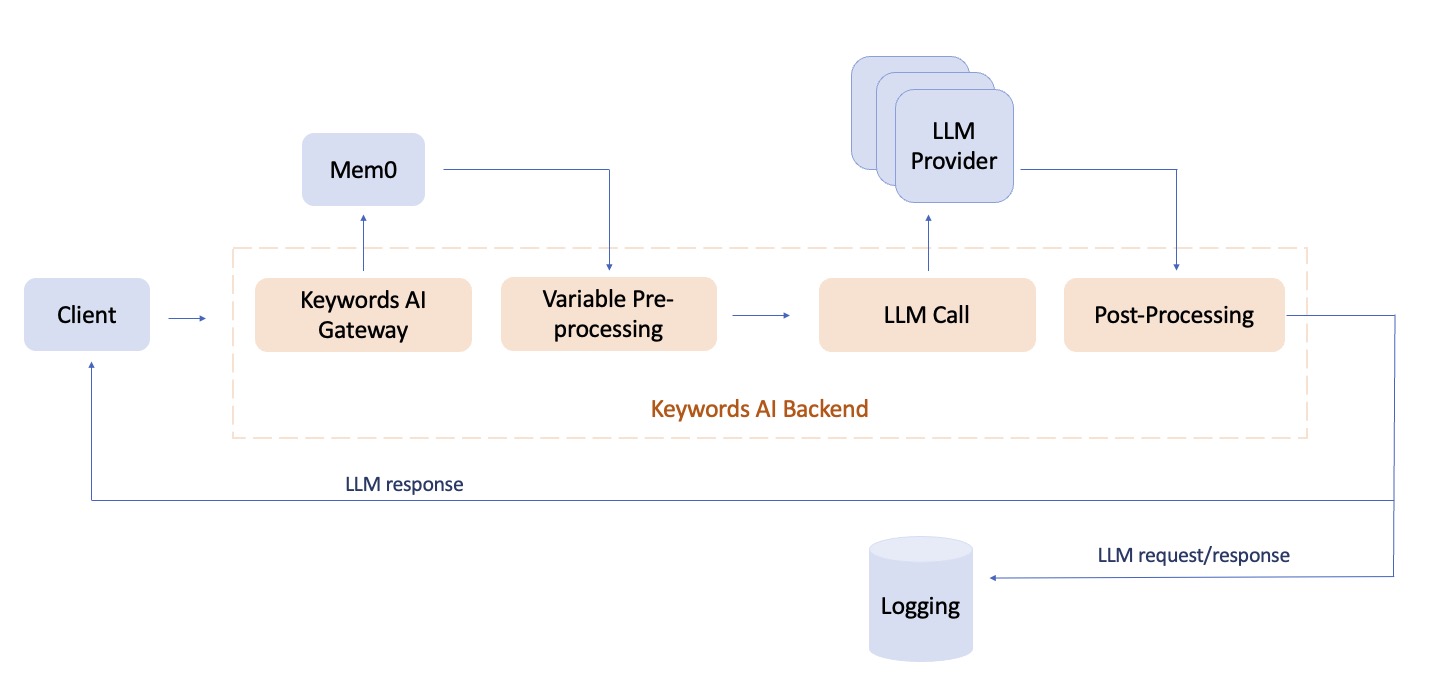 Mem0 is a self-improving memory layer for LLM applications, enabling personalized AI experiences that save costs and delight users.
Mem0 + Keywords AI provides a powerful combination for building AI applications that can remember user interactions over time and get complete LLM observability.
Check out the [Mem0 documentation](https://docs.mem0.ai) for more information.
## Quickstart
### Prerequisites
* A [Keywords AI API key](https://platform.keywordsai.co/platform/api/api-keys)
* A [Mem0 API key](https://app.mem0.ai/dashboard/api-keys)
### Add memory with Mem0 SDK
**Install the Mem0 Python client**
```bash theme={"system"}
pip install mem0
```
Add Keywords AI gateway to the Mem0 client as an LLM provider. You can go to the [Models page](https://platform.keywordsai.co/platform/models?sort_by=model_name) to find the available models.
```python Python {8-18} theme={"system"}
from mem0 import Memory
import os
api_key = os.getenv("MEM0_API_KEY")
keywordsai_api_key = os.getenv("KEYWORDSAI_API_KEY")
base_url = os.getenv("KEYWORDSAI_BASE_URL") # "https://api.keywordsai.co/api/"
config = {
"llm": {
"provider": "openai",
"config": {
"model": "gpt-4o-2024-08-06",
"temperature": 0.0,
"api_key": keywordsai_api_key,
"openai_base_url": base_url,
},
}
}
m = Memory.from_config(config_dict=config)
result = m.add(
"I like to take long walks on weekends.",
user_id="alice",
metadata={"category": "hobbies"},
)
print(result)
```
### Add memory with OpenAI SDK
Currently we only support adding memory to your AI products using the [OpenAI SDK integration](/integration/development-frameworks/llm_framework/openai/openai-sdk).
Once you integrate Keywords AI gateway with the OpenAI SDK, you can add memory to your AI product by following the code example below.
```python OpenAI Python SDK {18-27} theme={"system"}
client = OpenAI(
api_key=os.environ.get("KEYWORDSAI_API_KEY"),
base_url=os.environ.get("KEYWORDSAI_BASE_URL"),
)
def plain_json_version():
# Using plain JSON with the same structure
messages = [
{"role": "system", "content": "You are a helpful assistant."},
{
"role": "user",
"content": "Context: I like eating carrots, and I like to play basketball.",
},
]
response = client.chat.completions.create(
model="openai/gpt-4o",
messages=messages,
extra_body={
"mem0_params": {
"user_id": "user_1",
"org_id": "org_1",
"api_key": os.environ.get("MEM0_API_KEY"),
"add_memories": {
"messages": messages,
},
}
},
)
```
In this case, the `messages` will be added to the memory and the `query` will be used to search the memory.
### Add memory through Keywords AI SDK
We recommend using the [Keywords AI SDK](https://github.com/keywordsai/keywordsai-sdk) for better type checking and autocomplete.
**Install the Keywords AI SDK**
```bash theme={"system"}
pip install keywordsai-sdk
```
```python Keywords AI Python SDK {1-5, 28-37} theme={"system"}
from keywordsai_sdk.keywordsai_types.services_types.mem0_types import (
Mem0Params,
AddMemoriesParams,
SearchMemoriesParams,
)
from openai import OpenAI
client = OpenAI(
api_key=os.environ.get("KEYWORDSAI_API_KEY"),
base_url=os.environ.get("KEYWORDSAI_BASE_URL"),
)
def test_mem0_generation():
try:
# Create a request with linkup_params that will fail
mem0_memory = [
{"role": "system", "content": "You are a helpful assistant."},
{
"role": "user",
"content": "Context: I like eating carrots, and I like to play basketball.",
}
]
response = client.chat.completions.create(
model="openai/gpt-3.5-turbo",
messages=mem0_memory,
extra_body={
"mem0_params": Mem0Params(
user_id="user_1",
org_id="org_1",
api_key=os.environ.get("MEM0_API_KEY"),
add_memories=AddMemoriesParams(
messages=mem0_memory,
),
).model_dump(exclude_none=True),
},
)
print(json.dumps(response.model_dump(), indent=4), "response")
assert response.choices[0].message.content is not None
except Exception as e:
assert False
```
## Search memories
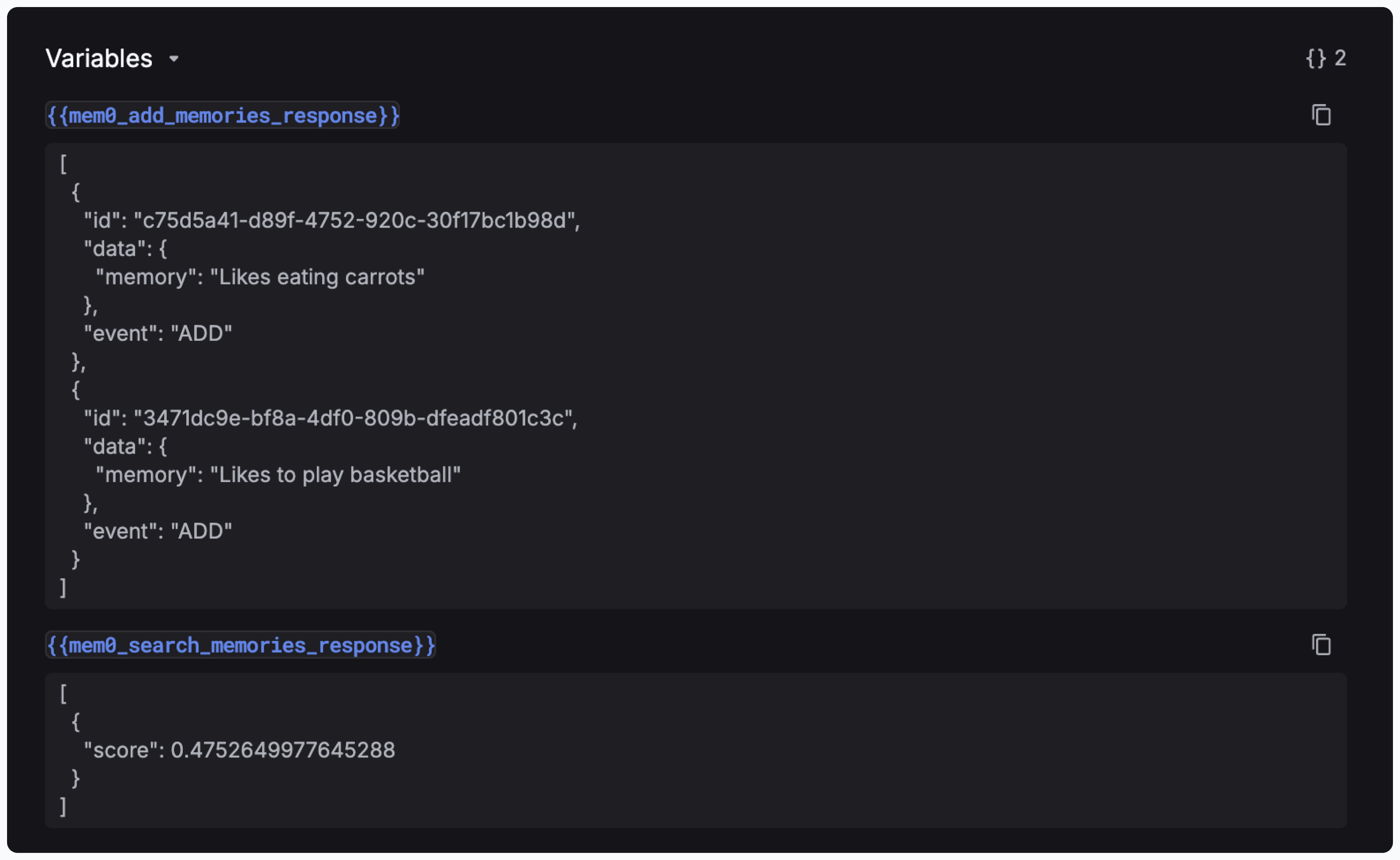
Once you pass the params like `mem0_search_memories_response` and `mem0_add_memories_response` to your prompt, you can view the responses in the side panel of Logs page.
Mem0 is a self-improving memory layer for LLM applications, enabling personalized AI experiences that save costs and delight users.
Mem0 + Keywords AI provides a powerful combination for building AI applications that can remember user interactions over time and get complete LLM observability.
Check out the [Mem0 documentation](https://docs.mem0.ai) for more information.
## Quickstart
### Prerequisites
* A [Keywords AI API key](https://platform.keywordsai.co/platform/api/api-keys)
* A [Mem0 API key](https://app.mem0.ai/dashboard/api-keys)
### Add memory with Mem0 SDK
**Install the Mem0 Python client**
```bash theme={"system"}
pip install mem0
```
Add Keywords AI gateway to the Mem0 client as an LLM provider. You can go to the [Models page](https://platform.keywordsai.co/platform/models?sort_by=model_name) to find the available models.
```python Python {8-18} theme={"system"}
from mem0 import Memory
import os
api_key = os.getenv("MEM0_API_KEY")
keywordsai_api_key = os.getenv("KEYWORDSAI_API_KEY")
base_url = os.getenv("KEYWORDSAI_BASE_URL") # "https://api.keywordsai.co/api/"
config = {
"llm": {
"provider": "openai",
"config": {
"model": "gpt-4o-2024-08-06",
"temperature": 0.0,
"api_key": keywordsai_api_key,
"openai_base_url": base_url,
},
}
}
m = Memory.from_config(config_dict=config)
result = m.add(
"I like to take long walks on weekends.",
user_id="alice",
metadata={"category": "hobbies"},
)
print(result)
```
### Add memory with OpenAI SDK
Currently we only support adding memory to your AI products using the [OpenAI SDK integration](/integration/development-frameworks/llm_framework/openai/openai-sdk).
Once you integrate Keywords AI gateway with the OpenAI SDK, you can add memory to your AI product by following the code example below.
```python OpenAI Python SDK {18-27} theme={"system"}
client = OpenAI(
api_key=os.environ.get("KEYWORDSAI_API_KEY"),
base_url=os.environ.get("KEYWORDSAI_BASE_URL"),
)
def plain_json_version():
# Using plain JSON with the same structure
messages = [
{"role": "system", "content": "You are a helpful assistant."},
{
"role": "user",
"content": "Context: I like eating carrots, and I like to play basketball.",
},
]
response = client.chat.completions.create(
model="openai/gpt-4o",
messages=messages,
extra_body={
"mem0_params": {
"user_id": "user_1",
"org_id": "org_1",
"api_key": os.environ.get("MEM0_API_KEY"),
"add_memories": {
"messages": messages,
},
}
},
)
```
In this case, the `messages` will be added to the memory and the `query` will be used to search the memory.
### Add memory through Keywords AI SDK
We recommend using the [Keywords AI SDK](https://github.com/keywordsai/keywordsai-sdk) for better type checking and autocomplete.
**Install the Keywords AI SDK**
```bash theme={"system"}
pip install keywordsai-sdk
```
```python Keywords AI Python SDK {1-5, 28-37} theme={"system"}
from keywordsai_sdk.keywordsai_types.services_types.mem0_types import (
Mem0Params,
AddMemoriesParams,
SearchMemoriesParams,
)
from openai import OpenAI
client = OpenAI(
api_key=os.environ.get("KEYWORDSAI_API_KEY"),
base_url=os.environ.get("KEYWORDSAI_BASE_URL"),
)
def test_mem0_generation():
try:
# Create a request with linkup_params that will fail
mem0_memory = [
{"role": "system", "content": "You are a helpful assistant."},
{
"role": "user",
"content": "Context: I like eating carrots, and I like to play basketball.",
}
]
response = client.chat.completions.create(
model="openai/gpt-3.5-turbo",
messages=mem0_memory,
extra_body={
"mem0_params": Mem0Params(
user_id="user_1",
org_id="org_1",
api_key=os.environ.get("MEM0_API_KEY"),
add_memories=AddMemoriesParams(
messages=mem0_memory,
),
).model_dump(exclude_none=True),
},
)
print(json.dumps(response.model_dump(), indent=4), "response")
assert response.choices[0].message.content is not None
except Exception as e:
assert False
```
## Search memories
Once you pass the params like `mem0_search_memories_response` and `mem0_add_memories_response` to your prompt, you can view the responses in the side panel of Logs page.
 You can search memories by using the `search_memories` parameter in the `Mem0Params` object.
```python Python theme={"system"}
response = client.chat.completions.create(
model="openai/gpt-3.5-turbo",
messages=[
{"role": "system", "content": "You are a helpful assistant."},
{
"role": "user",
"content": "Based on the {{mem0_search_memories_response}}, what is the user's favorite food?",
},
],
extra_body={
"mem0_params": Mem0Params(
user_id="user_1",
org_id="org_1",
api_key=os.environ.get("MEM0_API_KEY"),
add_memories=AddMemoriesParams(
messages=mem0_memory,
),
).model_dump(exclude_none=True),
},
)
```
You can search memories by using the `search_memories` parameter in the `Mem0Params` object.
```python Python theme={"system"}
response = client.chat.completions.create(
model="openai/gpt-3.5-turbo",
messages=[
{"role": "system", "content": "You are a helpful assistant."},
{
"role": "user",
"content": "Based on the {{mem0_search_memories_response}}, what is the user's favorite food?",
},
],
extra_body={
"mem0_params": Mem0Params(
user_id="user_1",
org_id="org_1",
api_key=os.environ.get("MEM0_API_KEY"),
add_memories=AddMemoriesParams(
messages=mem0_memory,
),
).model_dump(exclude_none=True),
},
)
```