> ## Documentation Index
> Fetch the complete documentation index at: https://docs.keywordsai.co/llms.txt
> Use this file to discover all available pages before exploring further.
# Haystack
> Monitor and trace your Haystack pipelines with Keywords AI for complete workflow visibility
This integration is for **workflow tracing**. For gateway features, see [Haystack Gateway](/integration/development-frameworks/llm_framework/haystack).
## Overview
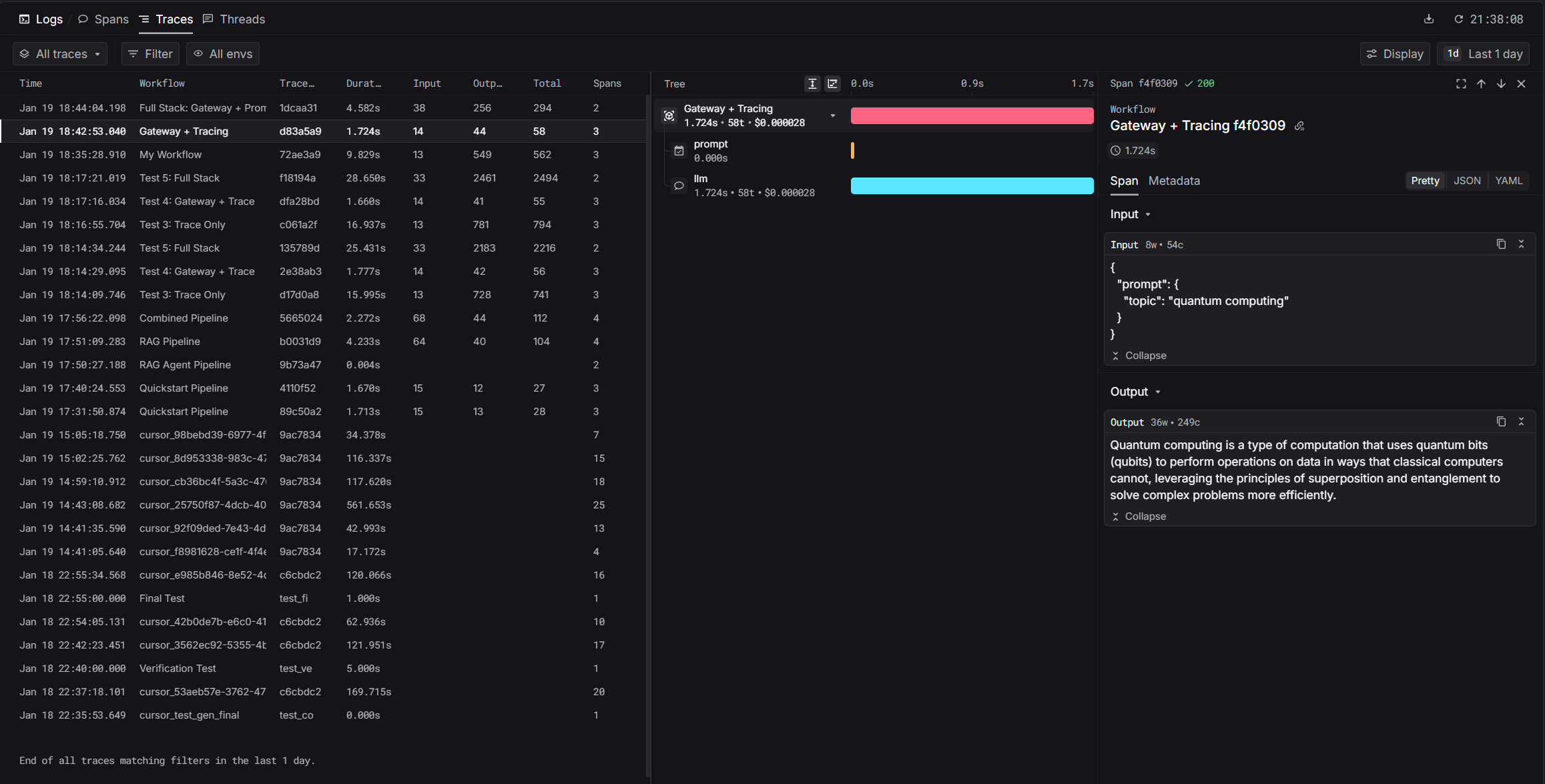
Haystack pipelines can have multiple components (retrievers, prompt builders, LLMs). The Keywords AI tracing integration captures your entire workflow execution, showing you exactly how data flows through each component.
 ## Installation
```bash theme={"system"}
pip install keywordsai-exporter-haystack
```
## Quickstart
```bash theme={"system"}
export KEYWORDSAI_API_KEY="your-keywords-ai-key"
export OPENAI_API_KEY="your-openai-key"
export HAYSTACK_CONTENT_TRACING_ENABLED="true"
```
The `HAYSTACK_CONTENT_TRACING_ENABLED` variable activates Haystack's tracing system.
```python theme={"system"}
import os
from haystack import Pipeline
from haystack.components.builders import PromptBuilder
from haystack.components.generators import OpenAIGenerator
from keywordsai_exporter_haystack import KeywordsAIConnector
os.environ["HAYSTACK_CONTENT_TRACING_ENABLED"] = "true"
# Create pipeline with tracing
pipeline = Pipeline()
pipeline.add_component("tracer", KeywordsAIConnector("My Workflow"))
pipeline.add_component("prompt", PromptBuilder(template="Tell me about {{topic}}."))
pipeline.add_component("llm", OpenAIGenerator(model="gpt-4o-mini"))
pipeline.connect("prompt", "llm")
# Run
result = pipeline.run({"prompt": {"topic": "artificial intelligence"}})
print(result["llm"]["replies"][0])
print(f"\nTrace URL: {result['tracer']['trace_url']}")
```
After running, you'll get a trace URL. Visit it to see:
* Pipeline execution timeline
* Each component's input/output
* Timing per component
* Token usage and costs
Dashboard: [platform.keywordsai.co/platform/traces](https://platform.keywordsai.co/platform/traces)
## Gateway Integration
For production workflows, combine tracing with gateway features like automatic logging, fallbacks, and cost optimization.
Learn how to route LLM calls through Keywords AI gateway
## Installation
```bash theme={"system"}
pip install keywordsai-exporter-haystack
```
## Quickstart
```bash theme={"system"}
export KEYWORDSAI_API_KEY="your-keywords-ai-key"
export OPENAI_API_KEY="your-openai-key"
export HAYSTACK_CONTENT_TRACING_ENABLED="true"
```
The `HAYSTACK_CONTENT_TRACING_ENABLED` variable activates Haystack's tracing system.
```python theme={"system"}
import os
from haystack import Pipeline
from haystack.components.builders import PromptBuilder
from haystack.components.generators import OpenAIGenerator
from keywordsai_exporter_haystack import KeywordsAIConnector
os.environ["HAYSTACK_CONTENT_TRACING_ENABLED"] = "true"
# Create pipeline with tracing
pipeline = Pipeline()
pipeline.add_component("tracer", KeywordsAIConnector("My Workflow"))
pipeline.add_component("prompt", PromptBuilder(template="Tell me about {{topic}}."))
pipeline.add_component("llm", OpenAIGenerator(model="gpt-4o-mini"))
pipeline.connect("prompt", "llm")
# Run
result = pipeline.run({"prompt": {"topic": "artificial intelligence"}})
print(result["llm"]["replies"][0])
print(f"\nTrace URL: {result['tracer']['trace_url']}")
```
After running, you'll get a trace URL. Visit it to see:
* Pipeline execution timeline
* Each component's input/output
* Timing per component
* Token usage and costs
Dashboard: [platform.keywordsai.co/platform/traces](https://platform.keywordsai.co/platform/traces)
## Gateway Integration
For production workflows, combine tracing with gateway features like automatic logging, fallbacks, and cost optimization.
Learn how to route LLM calls through Keywords AI gateway