> ## Documentation Index
> Fetch the complete documentation index at: https://docs.keywordsai.co/llms.txt
> Use this file to discover all available pages before exploring further.
# TS/JS
> Build multi-agent workflows with the OpenAI Agents SDK and Keywords AI.
This integration is only for **Agent tracing**. If you are looking for the OpenAI integration with the AI gateway, please see the [OpenAI integration](/integration/development-frameworks/llm_framework/openai/openai-sdk).
[Give us a star](https://github.com/Keywords-AI/keywordsai) on GitHub!
The [OpenAI Agents SDK](https://github.com/openai/openai-agents-js) is a lightweight yet powerful framework for building multi-agent workflows in JavaScript/TypeScript.
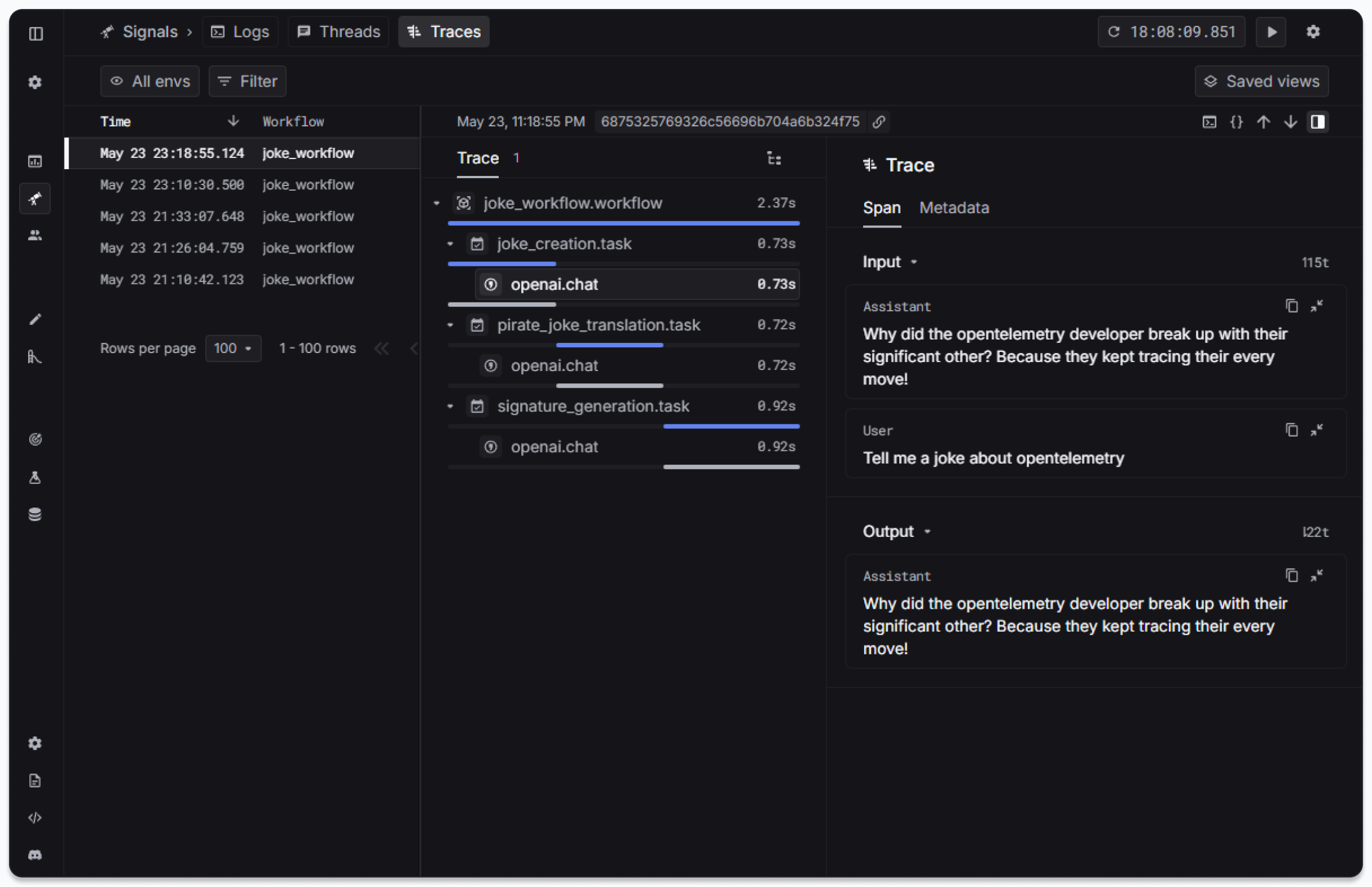
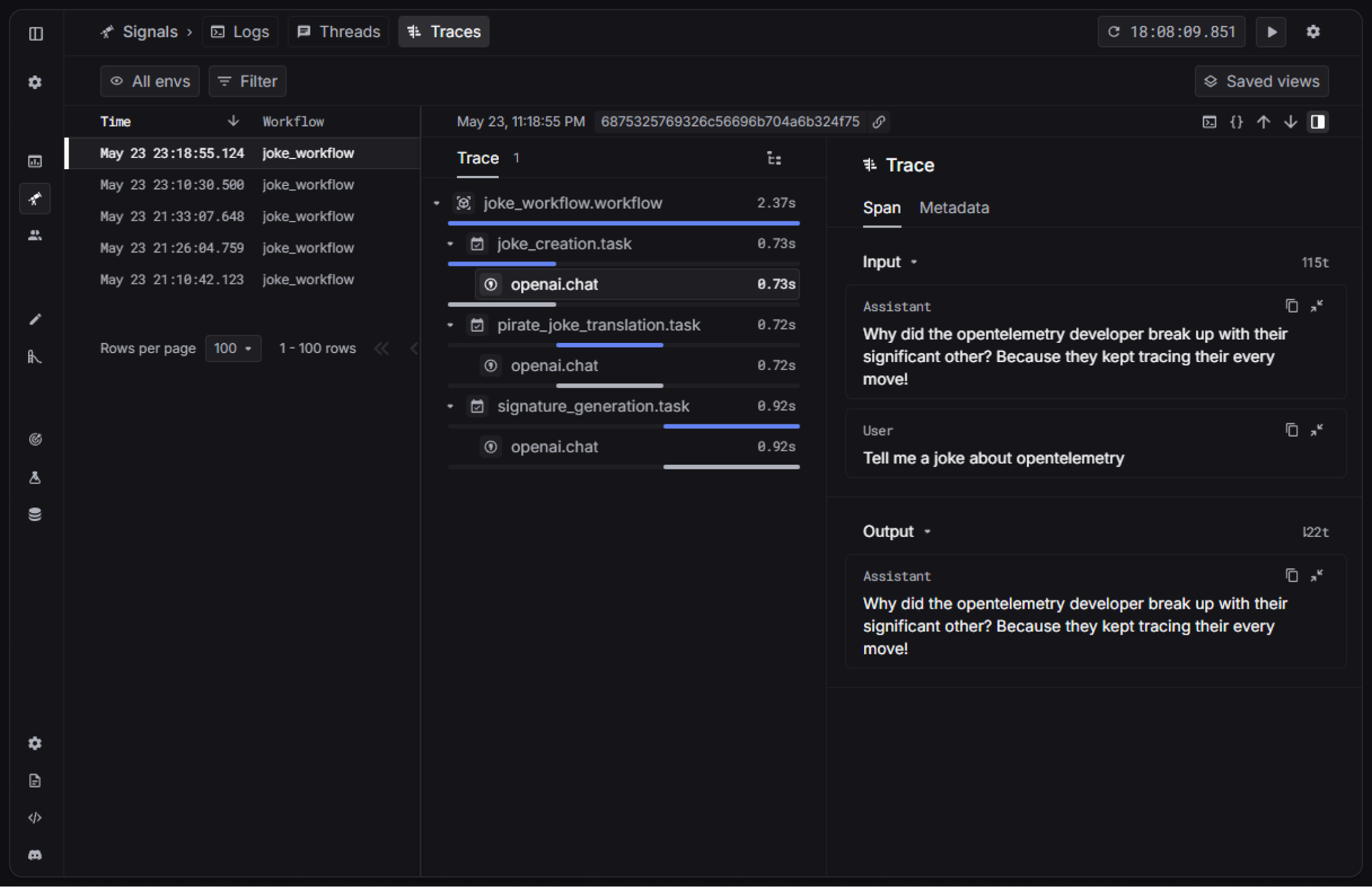 * **Agents**: LLMs configured with instructions, tools, and guardrails
* **Handoffs**: Transfer control between specialized agents
* **Guardrails**: Safety checks for input and output validation
* **Tracing**: Built-in tracking of agent runs for debugging and optimization
## Getting started
### Prerequisites
Install the required dependencies:
```bash theme={"system"}
npm install @openai/agents
```
```bash theme={"system"}
npm install @keywordsai/exporter-openai-agents
```
For function calling examples, also install:
```bash theme={"system"}
npm install zod
```
Set up your environment variables in a `.env` file:
```bash .env theme={"system"}
OPENAI_API_KEY=YOUR_OPENAI_API_KEY
KEYWORDSAI_API_KEY=YOUR_KEYWORDSAI_API_KEY
KEYWORDSAI_BASE_URL=https://api.keywordsai.co/api
```
If you are on the enterprise platform, please use the enterprise endpoint plus the suffix.
### Hello world
```typescript helloworld.ts theme={"system"}
import { Agent, BatchTraceProcessor, run, setTraceProcessors, withTrace } from '@openai/agents';
import { KeywordsAIOpenAIAgentsTracingExporter } from '@keywordsai/exporter-openai-agents';
setTraceProcessors([
new BatchTraceProcessor(
new KeywordsAIOpenAIAgentsTracingExporter(),
),
]);
async function main() {
const agent = new Agent({
name: 'Assistant',
instructions: 'You only respond in haikus.',
});
const result = await withTrace('Hello World', async () => {
return run(agent, 'Tell me about recursion in programming.');
});
console.log(result.finalOutput);
}
main().catch(console.error);
```
Run the example:
```bash theme={"system"}
npx tsx helloworld.ts
```
### Full example
Here's a more comprehensive example with multiple agents:
```typescript full-example.ts theme={"system"}
import { Agent, BatchTraceProcessor, run, setTraceProcessors, withTrace } from '@openai/agents';
import { KeywordsAIOpenAIAgentsTracingExporter } from '@keywordsai/exporter-openai-agents';
setTraceProcessors([
new BatchTraceProcessor(
new KeywordsAIOpenAIAgentsTracingExporter(),
),
]);
const agent = new Agent({
model: "gpt-4o-mini",
name: "Apple Agent",
instructions: "You are a helpful assistant who knows about apples.",
});
const secondAgent = new Agent({
model: "gpt-4o-mini",
name: "Banana Agent",
instructions: "You are a helpful assistant who knows about bananas.",
});
async function main() {
await withTrace("My Trace", async () => {
const response = await run(agent, "Hello, what fruit do you like?");
console.log(response.finalOutput);
const secondResponse = await run(secondAgent, "Hello, what fruit do you like?");
console.log(secondResponse.finalOutput);
});
}
main().catch(console.error);
```
Run the example:
```bash theme={"system"}
npx tsx full-example.ts
```
## Advanced features
### Metadata support
You can add custom metadata (properties) to your traces for better tracking and debugging:
```typescript metadata-example.ts theme={"system"}
import { Agent, BatchTraceProcessor, run, setTraceProcessors, withTrace } from '@openai/agents';
import { KeywordsAIOpenAIAgentsTracingExporter } from '@keywordsai/exporter-openai-agents';
setTraceProcessors([
new BatchTraceProcessor(
new KeywordsAIOpenAIAgentsTracingExporter(),
),
]);
const agent = new Agent({
model: "gpt-4o-mini",
name: "Apple Agent",
instructions: "You are a helpful assistant who knows about apples.",
});
const secondAgent = new Agent({
model: "gpt-4o-mini",
name: "Banana Agent",
instructions: "You are a helpful assistant who knows about bananas.",
});
async function main() {
await withTrace("My Trace", async () => {
const response = await run(agent, "Hello, what fruit do you like?");
console.log(response.finalOutput);
const secondResponse = await run(secondAgent, "Hello, what fruit do you like?");
console.log(secondResponse.finalOutput);
}, {
metadata: {
foo: "bar",
}
});
}
main().catch(console.error);
```
Run the example:
```bash theme={"system"}
npx tsx metadata-example.ts
```
### Function Calling
Agents can use tools to perform specific tasks. Here's an example with a weather tool:
```typescript function_call.ts theme={"system"}
import { Agent, BatchTraceProcessor, run, setTraceProcessors, tool, withTrace } from '@openai/agents';
import { KeywordsAIOpenAIAgentsTracingExporter } from '@keywordsai/exporter-openai-agents';
import { z } from 'zod';
setTraceProcessors([
new BatchTraceProcessor(
new KeywordsAIOpenAIAgentsTracingExporter(),
),
]);
const getWeather = tool({
name: 'get_weather',
description: 'Get the weather for a city.',
parameters: z.object({ city: z.string() }),
execute: async ({ city }): Promise<{ city: string; temperatureRange: string; conditions: string }> => {
return {
city,
temperatureRange: '14-20C',
conditions: 'Sunny with wind.',
};
},
});
const agent = new Agent({
name: "Hello world",
instructions: "You are a helpful agent.",
tools: [getWeather],
});
async function main() {
const result = await withTrace("What's the weather in Tokyo?", async () => {
return run(agent, "What's the weather in Tokyo?");
});
console.log(result.finalOutput);
}
main().catch(console.error);
```
Run the example:
```bash theme={"system"}
npx tsx function_call.ts
```
### Agent Handoffs
Agents can hand off conversations to other specialized agents based on context:
```typescript handoff.ts theme={"system"}
import { Agent, BatchTraceProcessor, run, setTraceProcessors, withTrace } from '@openai/agents';
import { KeywordsAIOpenAIAgentsTracingExporter } from '@keywordsai/exporter-openai-agents';
setTraceProcessors([
new BatchTraceProcessor(
new KeywordsAIOpenAIAgentsTracingExporter(),
),
]);
const spanish_agent = new Agent({
name: "Spanish agent",
instructions: "You only speak Spanish.",
});
const english_agent = new Agent({
name: "English agent",
instructions: "You only speak English",
});
const triage_agent = new Agent({
name: "Triage agent",
instructions: "Handoff to the appropriate agent based on the language of the request.",
handoffs: [spanish_agent, english_agent],
});
async function main() {
const result = await withTrace("Handoff Example", async () => {
return run(triage_agent, "Hola, ¿cómo estás?");
});
console.log(result.finalOutput);
}
main().catch(console.error);
```
Run the example:
```bash theme={"system"}
npx tsx handoff.ts
```
The resulting trace root span will have the custom properties visible in the Keywords AI platform:
* **Agents**: LLMs configured with instructions, tools, and guardrails
* **Handoffs**: Transfer control between specialized agents
* **Guardrails**: Safety checks for input and output validation
* **Tracing**: Built-in tracking of agent runs for debugging and optimization
## Getting started
### Prerequisites
Install the required dependencies:
```bash theme={"system"}
npm install @openai/agents
```
```bash theme={"system"}
npm install @keywordsai/exporter-openai-agents
```
For function calling examples, also install:
```bash theme={"system"}
npm install zod
```
Set up your environment variables in a `.env` file:
```bash .env theme={"system"}
OPENAI_API_KEY=YOUR_OPENAI_API_KEY
KEYWORDSAI_API_KEY=YOUR_KEYWORDSAI_API_KEY
KEYWORDSAI_BASE_URL=https://api.keywordsai.co/api
```
If you are on the enterprise platform, please use the enterprise endpoint plus the suffix.
### Hello world
```typescript helloworld.ts theme={"system"}
import { Agent, BatchTraceProcessor, run, setTraceProcessors, withTrace } from '@openai/agents';
import { KeywordsAIOpenAIAgentsTracingExporter } from '@keywordsai/exporter-openai-agents';
setTraceProcessors([
new BatchTraceProcessor(
new KeywordsAIOpenAIAgentsTracingExporter(),
),
]);
async function main() {
const agent = new Agent({
name: 'Assistant',
instructions: 'You only respond in haikus.',
});
const result = await withTrace('Hello World', async () => {
return run(agent, 'Tell me about recursion in programming.');
});
console.log(result.finalOutput);
}
main().catch(console.error);
```
Run the example:
```bash theme={"system"}
npx tsx helloworld.ts
```
### Full example
Here's a more comprehensive example with multiple agents:
```typescript full-example.ts theme={"system"}
import { Agent, BatchTraceProcessor, run, setTraceProcessors, withTrace } from '@openai/agents';
import { KeywordsAIOpenAIAgentsTracingExporter } from '@keywordsai/exporter-openai-agents';
setTraceProcessors([
new BatchTraceProcessor(
new KeywordsAIOpenAIAgentsTracingExporter(),
),
]);
const agent = new Agent({
model: "gpt-4o-mini",
name: "Apple Agent",
instructions: "You are a helpful assistant who knows about apples.",
});
const secondAgent = new Agent({
model: "gpt-4o-mini",
name: "Banana Agent",
instructions: "You are a helpful assistant who knows about bananas.",
});
async function main() {
await withTrace("My Trace", async () => {
const response = await run(agent, "Hello, what fruit do you like?");
console.log(response.finalOutput);
const secondResponse = await run(secondAgent, "Hello, what fruit do you like?");
console.log(secondResponse.finalOutput);
});
}
main().catch(console.error);
```
Run the example:
```bash theme={"system"}
npx tsx full-example.ts
```
## Advanced features
### Metadata support
You can add custom metadata (properties) to your traces for better tracking and debugging:
```typescript metadata-example.ts theme={"system"}
import { Agent, BatchTraceProcessor, run, setTraceProcessors, withTrace } from '@openai/agents';
import { KeywordsAIOpenAIAgentsTracingExporter } from '@keywordsai/exporter-openai-agents';
setTraceProcessors([
new BatchTraceProcessor(
new KeywordsAIOpenAIAgentsTracingExporter(),
),
]);
const agent = new Agent({
model: "gpt-4o-mini",
name: "Apple Agent",
instructions: "You are a helpful assistant who knows about apples.",
});
const secondAgent = new Agent({
model: "gpt-4o-mini",
name: "Banana Agent",
instructions: "You are a helpful assistant who knows about bananas.",
});
async function main() {
await withTrace("My Trace", async () => {
const response = await run(agent, "Hello, what fruit do you like?");
console.log(response.finalOutput);
const secondResponse = await run(secondAgent, "Hello, what fruit do you like?");
console.log(secondResponse.finalOutput);
}, {
metadata: {
foo: "bar",
}
});
}
main().catch(console.error);
```
Run the example:
```bash theme={"system"}
npx tsx metadata-example.ts
```
### Function Calling
Agents can use tools to perform specific tasks. Here's an example with a weather tool:
```typescript function_call.ts theme={"system"}
import { Agent, BatchTraceProcessor, run, setTraceProcessors, tool, withTrace } from '@openai/agents';
import { KeywordsAIOpenAIAgentsTracingExporter } from '@keywordsai/exporter-openai-agents';
import { z } from 'zod';
setTraceProcessors([
new BatchTraceProcessor(
new KeywordsAIOpenAIAgentsTracingExporter(),
),
]);
const getWeather = tool({
name: 'get_weather',
description: 'Get the weather for a city.',
parameters: z.object({ city: z.string() }),
execute: async ({ city }): Promise<{ city: string; temperatureRange: string; conditions: string }> => {
return {
city,
temperatureRange: '14-20C',
conditions: 'Sunny with wind.',
};
},
});
const agent = new Agent({
name: "Hello world",
instructions: "You are a helpful agent.",
tools: [getWeather],
});
async function main() {
const result = await withTrace("What's the weather in Tokyo?", async () => {
return run(agent, "What's the weather in Tokyo?");
});
console.log(result.finalOutput);
}
main().catch(console.error);
```
Run the example:
```bash theme={"system"}
npx tsx function_call.ts
```
### Agent Handoffs
Agents can hand off conversations to other specialized agents based on context:
```typescript handoff.ts theme={"system"}
import { Agent, BatchTraceProcessor, run, setTraceProcessors, withTrace } from '@openai/agents';
import { KeywordsAIOpenAIAgentsTracingExporter } from '@keywordsai/exporter-openai-agents';
setTraceProcessors([
new BatchTraceProcessor(
new KeywordsAIOpenAIAgentsTracingExporter(),
),
]);
const spanish_agent = new Agent({
name: "Spanish agent",
instructions: "You only speak Spanish.",
});
const english_agent = new Agent({
name: "English agent",
instructions: "You only speak English",
});
const triage_agent = new Agent({
name: "Triage agent",
instructions: "Handoff to the appropriate agent based on the language of the request.",
handoffs: [spanish_agent, english_agent],
});
async function main() {
const result = await withTrace("Handoff Example", async () => {
return run(triage_agent, "Hola, ¿cómo estás?");
});
console.log(result.finalOutput);
}
main().catch(console.error);
```
Run the example:
```bash theme={"system"}
npx tsx handoff.ts
```
The resulting trace root span will have the custom properties visible in the Keywords AI platform:
