> ## Documentation Index
> Fetch the complete documentation index at: https://docs.keywordsai.co/llms.txt
> Use this file to discover all available pages before exploring further.
# Anthropic
> Route Anthropic model calls through Keywords AI Gateway and track requests.
This section is for **Keywords AI LLM gateway** users.
Use Keywords AI Gateway to call Anthropic models while keeping unified observability (logs, cost, latency, and reliability metrics) in Keywords AI.
## Prerequisites
* A **Keywords AI API key**
* An **Anthropic API key** (BYOK)
Retrieve your API key from the Anthropic Console to begin integration.
## Supported SDKs / integrations
* [OpenAI SDK](/integration/development-frameworks/llm_framework/openai/openai-sdk)
* [LangChain SDK](/integration/development-frameworks/llm_framework/langchain)
* [Vercel/OpenAI](/integration/development-frameworks/llm_framework/vercel#openai)
* [Vercel/Google](/integration/development-frameworks/llm_framework/vercel#google)
* [LlamaIndex SDK](/integration/development-frameworks/llm_framework/llama-index)
* [Google GenAI](/integration/development-frameworks/llm_framework/google_genai)
* [Keywords native (Otel)](/get-started/quickstart/gateway)
* [Anthropic SDK](/integration/development-frameworks/llm_framework/anthropic)
* [Vercel/Anthropic](/integration/development-frameworks/llm_framework/vercel#anthropic)
## Configuration
There are 2 ways to add your Anthropic credentials to your requests:
### Via UI (Global)
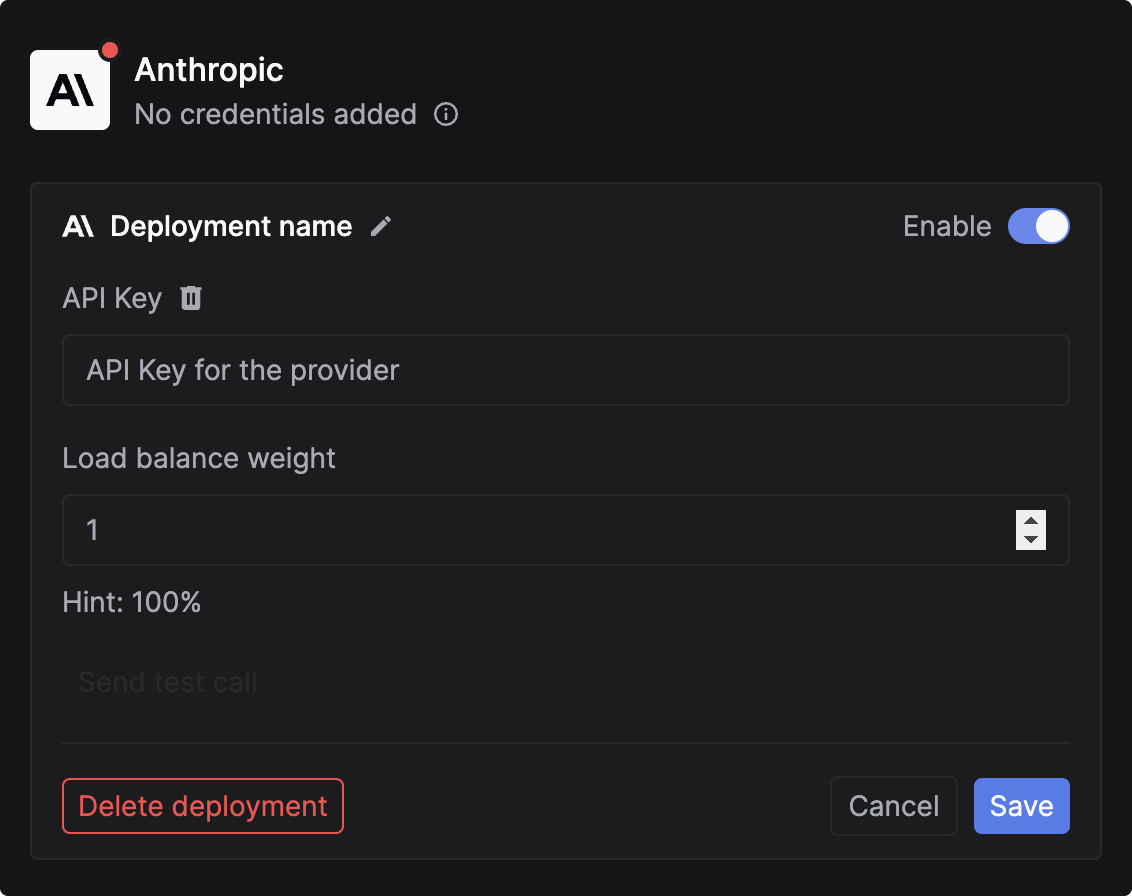
Go to the [Providers page](https://platform.keywordsai.co/platform/api/providers). This page allows you to manage credentials for over 20+ supported providers.
 Select Anthropic and paste your API key.
 ### Via code (Per-Request)
You can pass credentials dynamically in the request body. This is useful if you need to use your users' own API keys (BYOK).
Add the `customer_credentials` parameter to your [Gateway request](/api-endpoints/develop/gateway/chat-completions):
```json theme={"system"}
{
// Rest of the request body
"customer_credentials": {
"anthropic": {
"api_key": "YOUR_ANTHROPIC_API_KEY"
}
}
}
```
## Override credentials for a particular model (Optional)
One-off credential overrides. Instead of using what is uploaded for each provider, this targets credentials for individual models.
```json theme={"system"}
{
// Rest of the request body
"customer_credentials": {
"anthropic": {
"api_key": "YOUR_ANTHROPIC_API_KEY"
}
},
"credential_override": {
"claude-3-5-sonnet-20240620": {
"api_key": "ANOTHER_ANTHROPIC_API_KEY"
}
}
}
```
## Log Anthropic requests
Monitor your Anthropic Claude API calls by logging requests and responses asynchronously. Track metrics like cost, duration, and performance for all Claude models including Claude 3.5 Sonnet, Claude 3 Opus, and more.
```python Anthropic Python SDK theme={"system"}
import requests
url = "https://api.keywordsai.co/api/request-logs/create/"
payload = {
"model": "claude-3-5-sonnet-20240620",
"prompt_messages": [
{
"role": "user",
"content": "What's the weather like today?"
}
],
"completion_message": {
"role": "assistant",
"content": "I don't have access to real-time weather data, but I can help you find weather information."
},
"cost": 0.00042,
"generation_time": 1.8,
"customer_params": {
"customer_identifier": "user_456"
}
}
headers = {
"Authorization": "Bearer YOUR_KEYWORDS_AI_API_KEY",
"Content-Type": "application/json"
}
response = requests.post(url, headers=headers, json=payload)
```
Learn how to set up comprehensive logging for all your LLM requests
### Via code (Per-Request)
You can pass credentials dynamically in the request body. This is useful if you need to use your users' own API keys (BYOK).
Add the `customer_credentials` parameter to your [Gateway request](/api-endpoints/develop/gateway/chat-completions):
```json theme={"system"}
{
// Rest of the request body
"customer_credentials": {
"anthropic": {
"api_key": "YOUR_ANTHROPIC_API_KEY"
}
}
}
```
## Override credentials for a particular model (Optional)
One-off credential overrides. Instead of using what is uploaded for each provider, this targets credentials for individual models.
```json theme={"system"}
{
// Rest of the request body
"customer_credentials": {
"anthropic": {
"api_key": "YOUR_ANTHROPIC_API_KEY"
}
},
"credential_override": {
"claude-3-5-sonnet-20240620": {
"api_key": "ANOTHER_ANTHROPIC_API_KEY"
}
}
}
```
## Log Anthropic requests
Monitor your Anthropic Claude API calls by logging requests and responses asynchronously. Track metrics like cost, duration, and performance for all Claude models including Claude 3.5 Sonnet, Claude 3 Opus, and more.
```python Anthropic Python SDK theme={"system"}
import requests
url = "https://api.keywordsai.co/api/request-logs/create/"
payload = {
"model": "claude-3-5-sonnet-20240620",
"prompt_messages": [
{
"role": "user",
"content": "What's the weather like today?"
}
],
"completion_message": {
"role": "assistant",
"content": "I don't have access to real-time weather data, but I can help you find weather information."
},
"cost": 0.00042,
"generation_time": 1.8,
"customer_params": {
"customer_identifier": "user_456"
}
}
headers = {
"Authorization": "Bearer YOUR_KEYWORDS_AI_API_KEY",
"Content-Type": "application/json"
}
response = requests.post(url, headers=headers, json=payload)
```
Learn how to set up comprehensive logging for all your LLM requests