Documentation Index
Fetch the complete documentation index at: https://docs.keywordsai.co/llms.txt
Use this file to discover all available pages before exploring further.
What is traces?
Traces are a chained collection of workflows and tasks. You can use tree views and waterfalls to better track dependencies and latency.
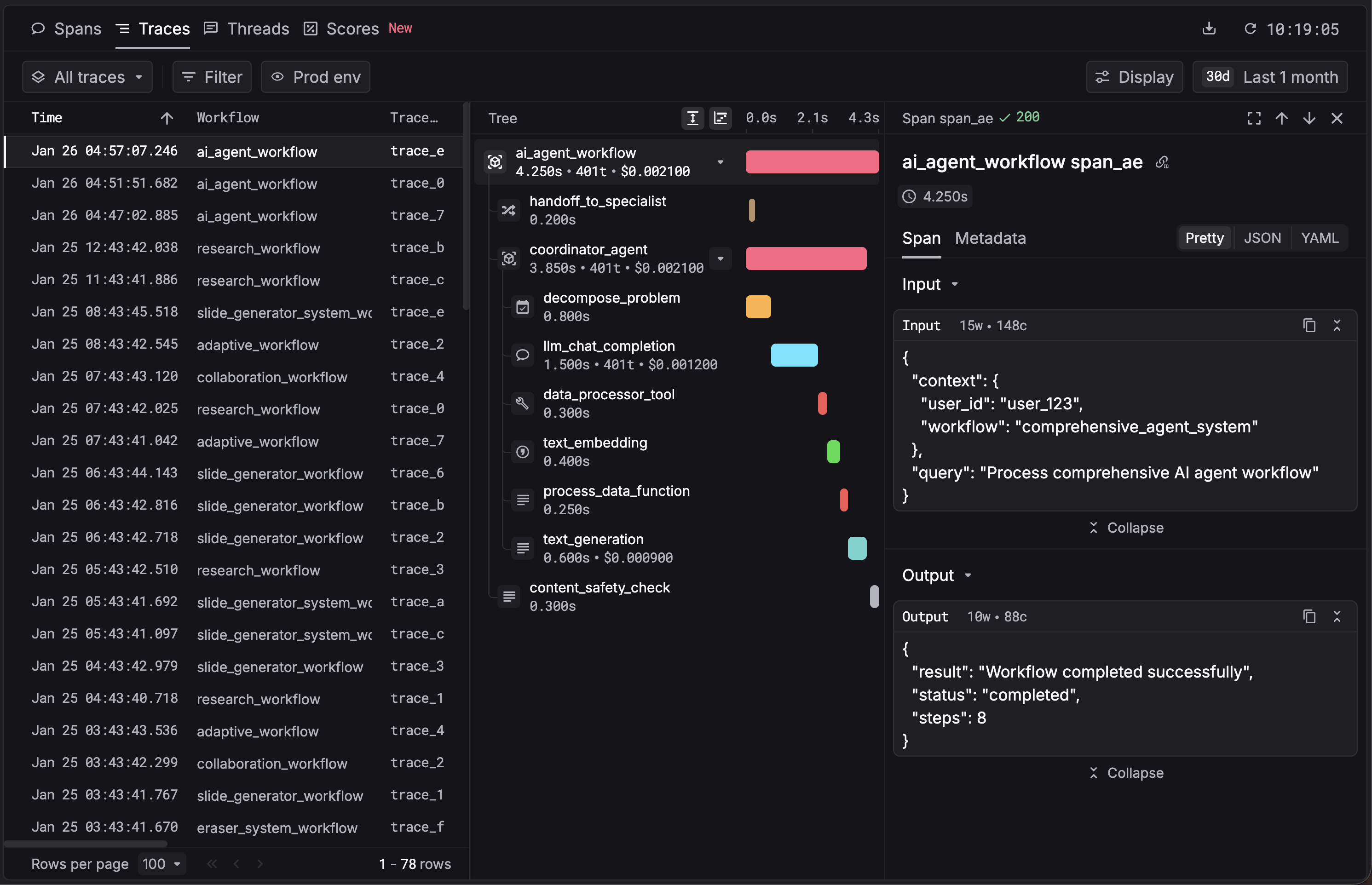
Use agent tracing
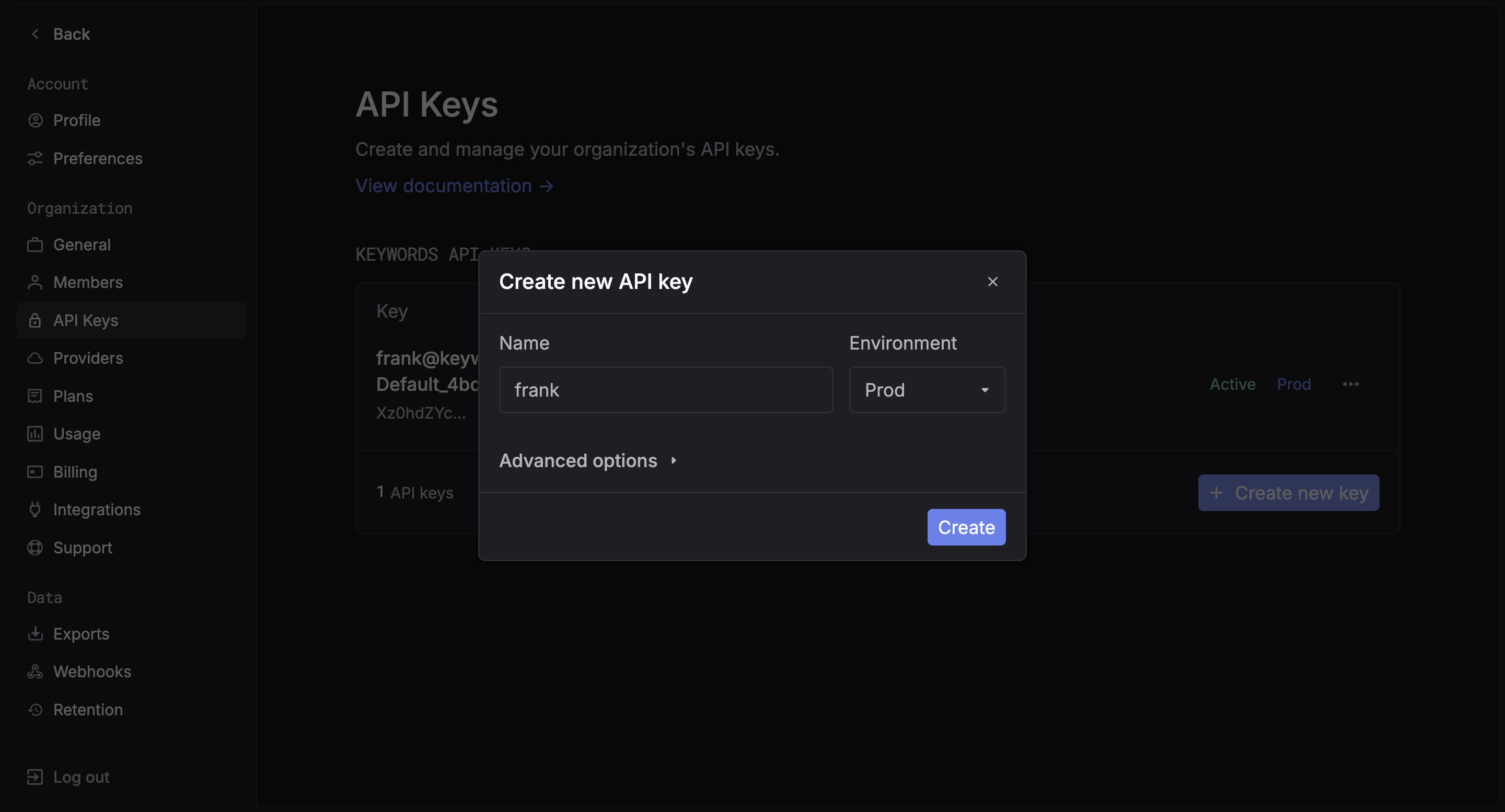
1. Get your Keywords AI API key
After you create an account on Keywords AI, you can get your API key from the API keys page.
2. Keywords AI Native (OpenTelemetry)
You just need to add the keywordsai_tracing package to your project and annotate your workflows.
Install the SDK
Python Requirement: This package requires Python 3.9 or later.
pip install keywordsai-tracing
Set up Environment Variables
Get your API key from the API Keys page in Settings, then configure it in your environment:KEYWORDSAI_BASE_URL="https://api.keywordsai.co/api"
KEYWORDSAI_API_KEY="YOUR_KEYWORDSAI_API_KEY"
A full example with LLM calls
Use the @workflow and @task decorators to instrument your code:import os
from openai import OpenAI
from keywordsai_tracing.decorators import workflow, task
from keywordsai_tracing.main import KeywordsAITelemetry
# Initialize Keywords AI Telemetry
os.environ["KEYWORDSAI_API_KEY"] = "YOUR_KEYWORDSAI_API_KEY"
k_tl = KeywordsAITelemetry()
# Initialize OpenAI client
client = OpenAI()
@task(name="joke_creation")
def create_joke():
completion = client.chat.completions.create(
model="gpt-4o-mini",
messages=[{"role": "user", "content": "Tell me a joke about AI"}],
temperature=0.7,
max_tokens=100,
)
return completion.choices[0].message.content
@workflow(name="simple_joke_workflow")
def joke_workflow():
joke = create_joke()
return joke
if __name__ == "__main__":
result = joke_workflow()
print(result)
Install the SDK
Install the package using your preferred package manager:npm install @keywordsai/tracing
# or yarn
yarn add @keywordsai/tracing
Set up Environment Variables
Get your API key from the API Keys page in Settings, then configure it in your environment:KEYWORDSAI_BASE_URL="https://api.keywordsai.co/api"
KEYWORDSAI_API_KEY="YOUR_KEYWORDSAI_API_KEY"
OPENAI_API_KEY="YOUR_OPENAI_API_KEY"
Create a simple workflow
import { KeywordsAITelemetry } from '@keywordsai/tracing';
import OpenAI from 'openai';
// Initialize Keywords AI Telemetry
const keywordsAi = new KeywordsAITelemetry({
apiKey: process.env.KEYWORDSAI_API_KEY || "",
appName: 'test-app',
disableBatch: true // For testing, disable batching
});
// Initialize OpenAI client
const openai = new OpenAI();
async function createJoke() {
return await keywordsAi.withTask(
{ name: 'joke_creation' },
async () => {
const completion = await openai.chat.completions.create({
messages: [{ role: 'user', content: 'Tell me a joke about AI' }],
model: 'gpt-4o-mini',
temperature: 0.7,
max_tokens: 100
});
return completion.choices[0].message.content;
}
);
}
async function simpleJokeWorkflow() {
return await keywordsAi.withWorkflow(
{ name: 'simple_joke_workflow' },
async () => {
const joke = await createJoke();
return joke;
}
);
}
// Run the workflow
async function main() {
const result = await simpleJokeWorkflow();
console.log(result);
}
main().catch(console.error);
Optional HTTP instrumentation
If you see logs like:install the OpenTelemetry instrumentations to enable and silence these messages:pip install opentelemetry-instrumentation-requests opentelemetry-instrumentation-urllib3
This is optional; tracing works without them. Add only if your app uses requests or urllib3.
3. View your traces
You can now see your traces in the Traces.
Integrate with your existing AI framework
Keywords AI also integrates seamlessly with popular AI frameworks to give you complete observability into your agent workflows.