Documentation Index
Fetch the complete documentation index at: https://docs.keywordsai.co/llms.txt
Use this file to discover all available pages before exploring further.
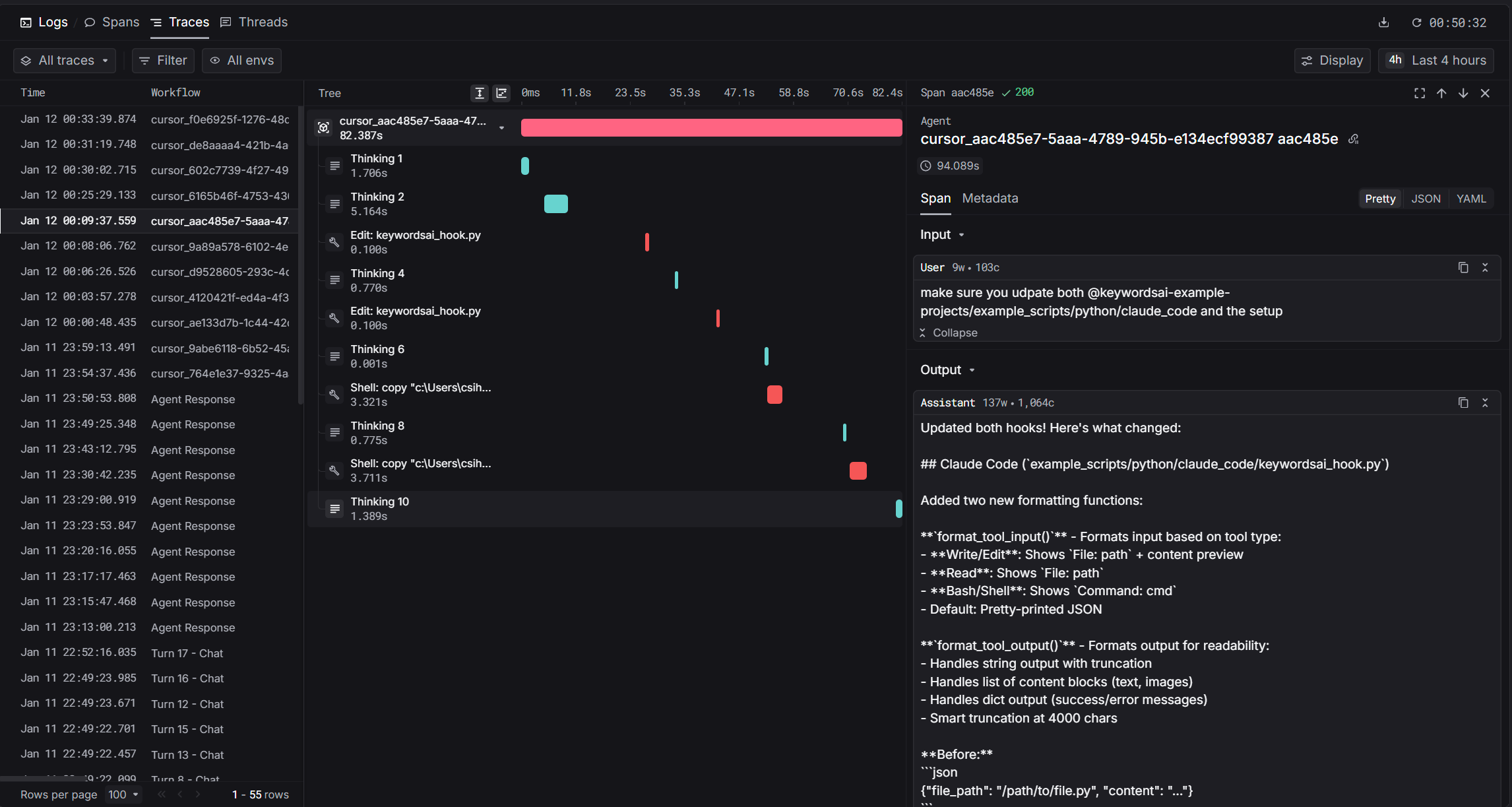
Cursor is an AI-powered code editor with built-in agent capabilities. With Keywords AI integration, you get hierarchical traces of every agent interaction including thinking blocks, file edits, shell commands, and MCP tool calls.
How It Works
Cursor provides hooks that fire during agent execution. Our integration captures these events in real-time and sends them to Keywords AI as hierarchical traces.
The hook captures thinking blocks, file edits, shell commands, and MCP tool calls as child spans under a root agent span.
Prerequisites
Installation
1. Set Environment Variables
Add these to your shell profile (.bashrc, .zshrc, or PowerShell $PROFILE):
export KEYWORDSAI_API_KEY="your-api-key"
export TRACE_TO_KEYWORDSAI="true"
# Optional: Enterprise endpoint (default: api.keywordsai.co)
# export KEYWORDSAI_BASE_URL="https://endpoint.keywordsai.co/api"
# Optional: Enable debug logging
# export CURSOR_KEYWORDSAI_DEBUG="true"
2. Download the Hook Script
Download the hook script to your Cursor hooks directory:
mkdir -p ~/.cursor/hooks
curl -o ~/.cursor/hooks/keywordsai_hook.py \
https://raw.githubusercontent.com/Keywords-AI/keywordsai-example-projects/main/example_scripts/python/cursor/keywordsai_hook.py
Create ~/.cursor/hooks.json with the following configuration:
{
"version": 1,
"hooks": {
"beforeSubmitPrompt": [
{ "command": "python ~/.cursor/hooks/keywordsai_hook.py" }
],
"afterAgentThought": [
{ "command": "python ~/.cursor/hooks/keywordsai_hook.py" }
],
"afterAgentResponse": [
{ "command": "python ~/.cursor/hooks/keywordsai_hook.py" }
],
"afterShellExecution": [
{ "command": "python ~/.cursor/hooks/keywordsai_hook.py" }
],
"afterFileEdit": [
{ "command": "python ~/.cursor/hooks/keywordsai_hook.py" }
],
"afterMCPExecution": [
{ "command": "python ~/.cursor/hooks/keywordsai_hook.py" }
],
"stop": [
{ "command": "python ~/.cursor/hooks/keywordsai_hook.py" }
]
}
}
4. Restart Cursor
Restart Cursor IDE to apply the hooks configuration.
Hooks Reference
| Hook | Trigger | Data Captured |
|---|
beforeSubmitPrompt | User sends prompt | User input, start time |
afterAgentThought | Agent thinking | Thinking text, duration |
afterShellExecution | Shell command completes | Command, output, duration |
afterFileEdit | File edited | File path, edits |
afterMCPExecution | MCP tool completes | Tool name, input, output, duration |
afterAgentResponse | Agent responds | Response text (creates root span) |
stop | Agent stops | Cleanup |
Span Types
| Span | log_type | Description |
|---|
| Root | agent | The complete agent turn |
| Thinking | generation | Agent reasoning blocks |
| Shell/File/MCP | tool | Tool invocations |
Trace Fields
| Field | Value | Description |
|---|
trace_unique_id | {conversation_id}_{generation_id} | Unique per turn |
span_workflow_name | cursor_{conversation_id} | Groups all turns |
thread_identifier | cursor_{conversation_id} | Links turns in Threads view |
Debugging
Check the log file for issues:
tail -f ~/.cursor/state/keywordsai_hook.log
Common Issues
| Issue | Solution |
|---|
| No traces appearing | Check TRACE_TO_KEYWORDSAI=true is set |
| API errors | Verify KEYWORDSAI_API_KEY is correct |
| Only root span | Ensure all hooks are configured in hooks.json |
| Missing thinking | Check afterAgentThought hook is active |
Example Output
After setup, you’ll see traces in Keywords AI with full hierarchy:
cursor_abc123_xyz789 (38.9s)
├── Thinking 1 (0.5s) - "Let me analyze the code..."
├── Thinking 2 (0.3s) - "I should update the function..."
├── Edit: utils.py (0.1s)
├── Shell: npm test (4.1s)
└── Thinking 3 (0.2s) - "Tests passed, done."
Source Code
The full source code is available on GitHub: Keywords-AI/keywordsai-example-projects/cursor
References