

Azure OpenAI requires three credentials: API key, API base URL (also called base_url or endpoint), and API version. Make sure you have all three from your Azure Portal before proceeding.
Prerequisites
Before integrating Azure OpenAI with Keywords AI, ensure you have:- An active Azure OpenAI subscription
- At least one deployed model in your Azure OpenAI resource
- Your deployment name matches those listed on our Models page
How to get your Azure OpenAI credentials
1
Access Azure Portal
Visit your Azure Portal OpenAI Service.You will see your deployments. Choose the deployment you want to use.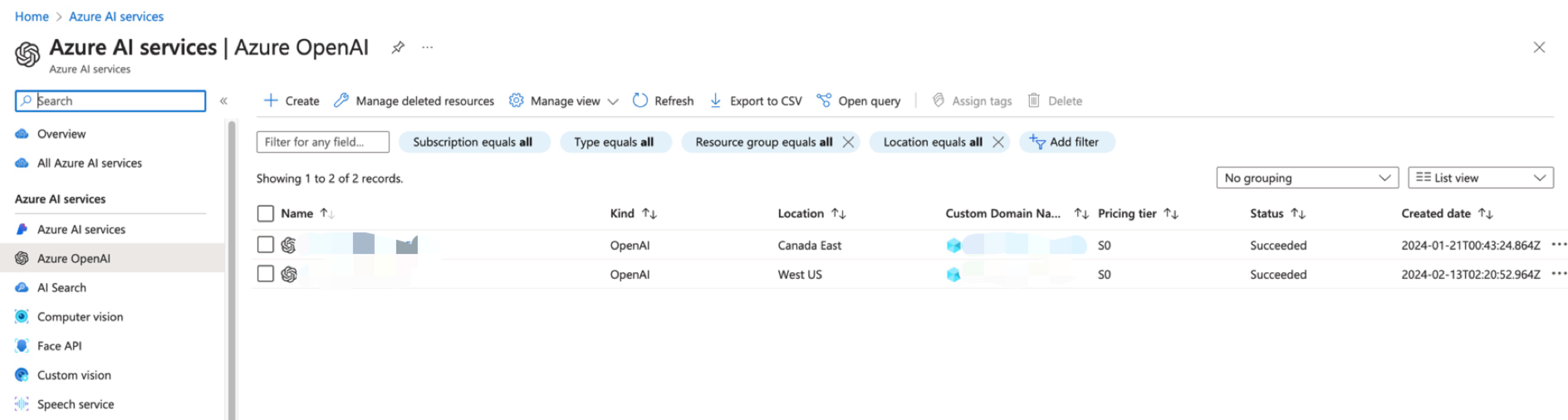
2
Get your API Base URL (endpoint)
Click on the “Endpoints” link to view your API base URL.
The API base URL is also called endpoint or base_url. For OpenAI, this would be
https://api.openai.com, but for Azure it’s unique to your resource (e.g., https://your-resource.openai.azure.com/).3
Get your API Key
Click on the “Manage Keys” link to view your API keys. You can use either Key 1 or Key 2.
4
Choose API Version
Pick an API version from the available Azure OpenAI versions.
Common API versions
Common API versions
2024-10-21(recommended)2024-08-01-preview2024-06-012024-02-01
Azure OpenAI models compatibility
✅ Supported Frameworks
✅ Supported Frameworks
❌ Unsupported Frameworks
❌ Unsupported Frameworks
Add Azure OpenAI credentials
There are 2 ways to add your Azure OpenAI credentials to your requests:Option 1: Via UI (Recommended)
1
Navigate to Providers page
Go to Providers page and select Azure OpenAI.
2
Add your credentials
Fill in the three required Azure OpenAI credentials: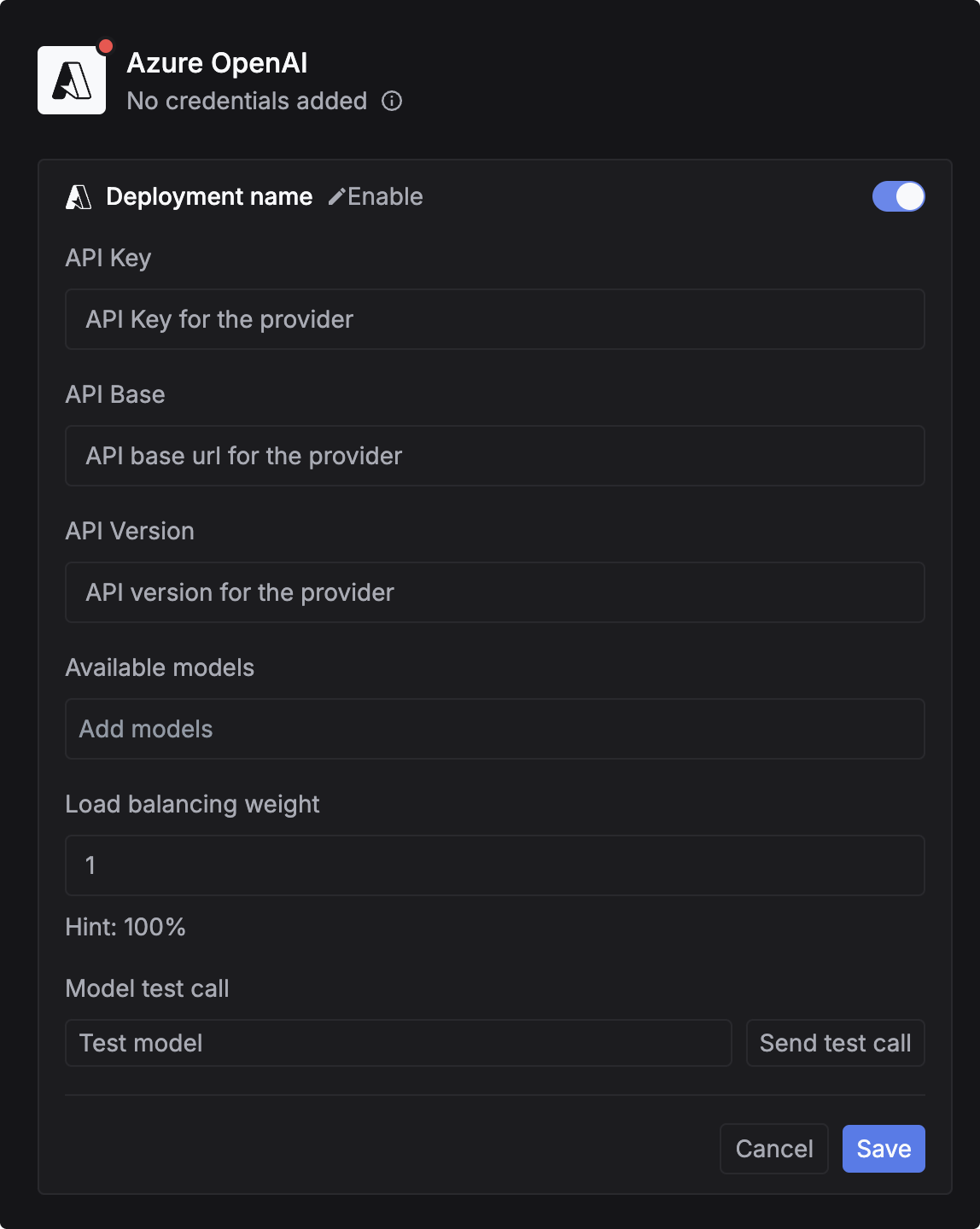
string
required
Your Azure OpenAI API key from the Azure Portal.
string
required
Your Azure OpenAI endpoint URL (also called base_url or endpoint).
What is api_base?
What is api_base?
The
api_base (synonyms: base_url, endpoint) is the base URL for your Azure OpenAI resource.Examples:- Azure OpenAI:
https://your-resource.openai.azure.com/ - OpenAI (for reference):
https://api.openai.com
string
required
Your Azure OpenAI API version (e.g.,
2024-10-21). See available versions.3
Map your deployment name
Azure allows custom deployment names. You need to map your deployment name so Keywords AI knows which Azure deployment to call.Important: When testing the model, use the format 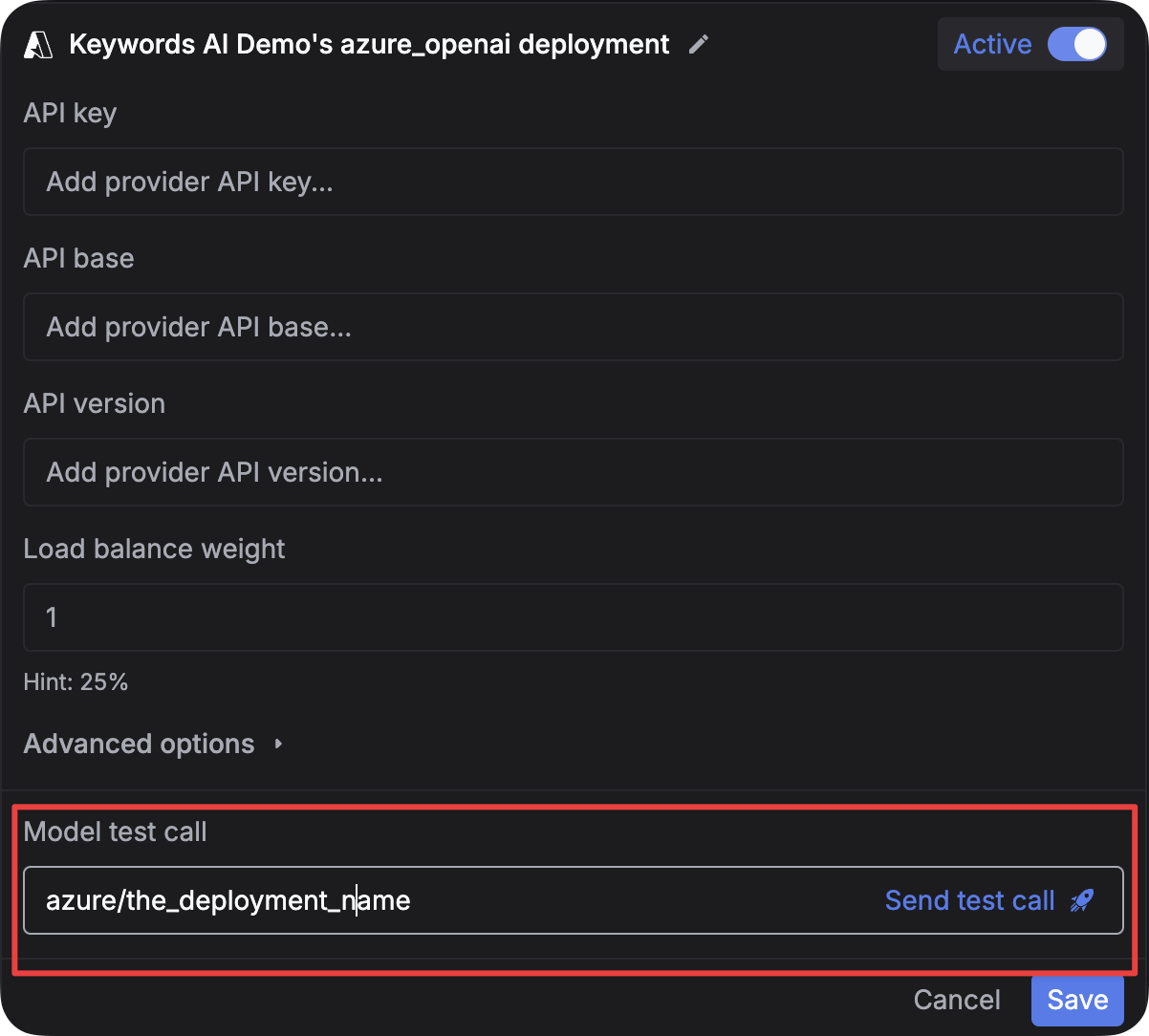
azure/{your-deployment-name} in the model test input.For example:- If your Azure deployment name is
gpt-4o, use:azure/gpt-4o - If your Azure deployment name is
my-gpt4-deployment, use:azure/my-gpt4-deployment
4
(Optional) Specify models to use these credentials
You can limit which models use these credentials. Leave empty to apply your credentials for all Azure OpenAI models.To specify models: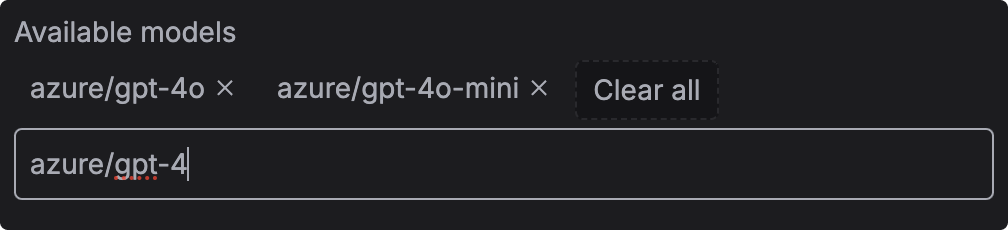
- Go to the Models page
- Copy the model ID (e.g.,
azure/gpt-4o) - Paste it in the input field
- Press
Enterto add the model
Option 2: Via Code
- OpenAI SDK
- Standard API
1
Install OpenAI SDK
2
Initialize client with Azure credentials
3
(Optional) Map custom deployment names
If your Azure deployment name differs from the standard model name, use
model_name_map to specify the mapping.Example: If you deployed gpt-4o with a custom name like my-gpt4-prod, map it like this:model_name_map only works when your credentials are valid.4
(Optional) Override credentials for specific models
You can override credentials for individual models without changing the default credentials.
5
(Optional) Load balance between multiple deployments
You can add multiple Azure deployments and load balance between them for better availability and cost optimization.Learn more: Load Balancing Guide
Testing your integration
Requirements and troubleshooting
Requirements
- Deployment name format: Use
azure/{deployment-name}format (e.g.,azure/gpt-4o) - Credentials match: Ensure your deployment name is correctly mapped if using custom names
- Regional availability: Confirm your models are available in the region specified by your credentials
- API version: Use a supported Azure OpenAI API version
Common issues
Error: Deployment not found
Error: Deployment not found
Cause: Your deployment name doesn’t match what’s configured in Azure.Solution:
- Check your Azure deployment name in the Azure Portal
- Use
model_name_mapto map the standard model name to your custom deployment name - Ensure you’re using the
azure/prefix (e.g.,azure/gpt-4o)
Error: Invalid credentials
Error: Invalid credentials
Cause: One or more of your Azure credentials are incorrect.Solution:
- Verify
api_keyin Azure Portal → Manage Keys - Verify
api_basematches your resource endpoint exactly (including trailing slash) - Verify
api_versionis a valid version
Model test call input is confusing
Model test call input is confusing
Issue: The “Model test call” input field is for specifying which model to test, not the message.Correct usage:
- Model test call input:
azure/gpt-4o(the model identifier withazure/prefix) - Message/chat input: Your actual message like “Hello, how are you?”
azure/gpt-4o for Azure providers, not just gpt-4o.Supported models
DeepSeek models
azure_deepseek/deepseek-v3azure_deepseek/deepseek-chatazure_deepseek/deepseek-reasonerazure_deepseek/deepseek-r1
O-series models
azure/o1azure/o3azure/o3-miniazure/o4-mini
GPT-4 series
azure/gpt-4azure/gpt-4-32kazure/gpt-4-1106-previewazure/gpt-4-vision-previewazure/gpt-4oazure/gpt-4o-miniazure/gpt-4o-2024-08-06azure/gpt-4.1azure/gpt-4.1-miniazure/gpt-4.1-nano
GPT-5 series
azure/gpt-5azure/gpt-5-mini
GPT-3.5 series
azure/gpt-35-turbo